

FOR CONSTRUCTION FLEETS

Construction Fleet Management Software Your Operators Will Use

Fewer surprise breakdowns, and a maintenance record you can defend.

Simply Fleet schedules your excavators on engine hours and your pickups on mileage. Operators file inspections and fuel logs from their phones, so cost per asset builds as the work orders close. No hardware to install.

MIXED FLEET

Every Asset on One Record, Whether It Runs on Miles or Hours

One set of numbers for the whole fleet, trucks and iron.

Construction fleet management software tracks the vehicles and heavy equipment a contractor runs across jobsites. In Simply Fleet, set each asset’s primary meter and its service intervals follow it.

RUNS ON MILES

Pickup trucks, service trucks, and crew vehicles.

Ford F 250 crew truck
42,180 mi
Service interval
every 5,000 mi
RUNS ON HOURS

Excavators, loaders, dozers, skid steers, and cranes.

CAT 320 excavator
1,240 hrs
Service interval
every 250 hrs

Both sit in one system. Same inspection forms, same work orders, same cost history, one service record per machine across every jobsite.

Trailers, generators, compactors, and hand tools sit in the same fleet under the Small Equipment add on.

BUYING CRITERIA

What to Look for in Construction Fleet Management Software

Six questions worth asking on any demo, ours included.

Engine hour scheduling

Can service intervals run on engine hours, per asset?

Mixed asset support

Do trucks and heavy equipment share one inspection, service, and cost workflow?

Operator level mobile access

Can the person running the machine file a record on a phone, untrained?

Inspection to repair handoff

Does a failed item become a work order without anyone re entering it?

Cost recorded per asset

Do fuel, parts, and labor attach to the machine that consumed them?

Time to live

How many days until the fleet is running, and does it need hardware on every asset?

MULTI JOBSITE FLEETS

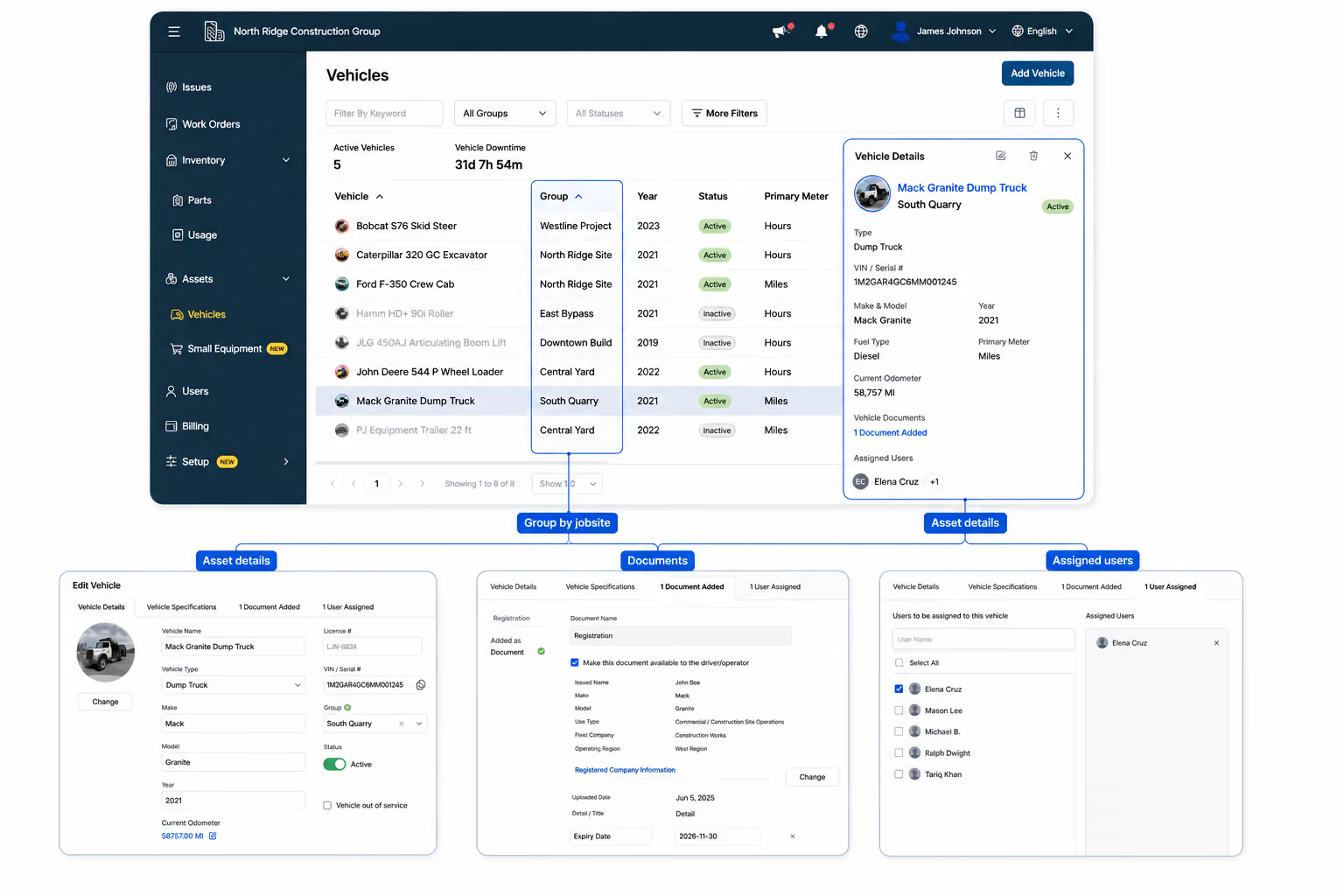
Keep Fleet Records Organized Across Every Jobsite

Machines move between sites. Their records move with them.

Group vehicles and equipment by jobsite, crew, division, or business unit while keeping one complete record for every asset. Whether a machine stays on one project or moves between jobsites, its records move with it.

Assign operators to the equipment they use
Filter reports by jobsite or fleet group
Keep inspections, maintenance, work orders, and costs attached to the asset
Move equipment between sites without losing its service history
Vehicles grouped by jobsite with asset details, documents, and assigned users in Simply Fleet construction fleet management software

Assets grouped by jobsite, with documents and assigned operators on each record.

CONSTRUCTION EQUIPMENT INSPECTIONS

Inspection Forms Built Per Asset Type, Filed From the Cab

Find the failure while it is still a repair.

Build a form for excavators, another for trucks, another for attachments, and assign each to the operators who run those machines. Items are marked pass or fail with photos on the failures. You end up with a dated inspection history per asset, which is the record an insurer, a safety audit, or a DOT review asks to see.
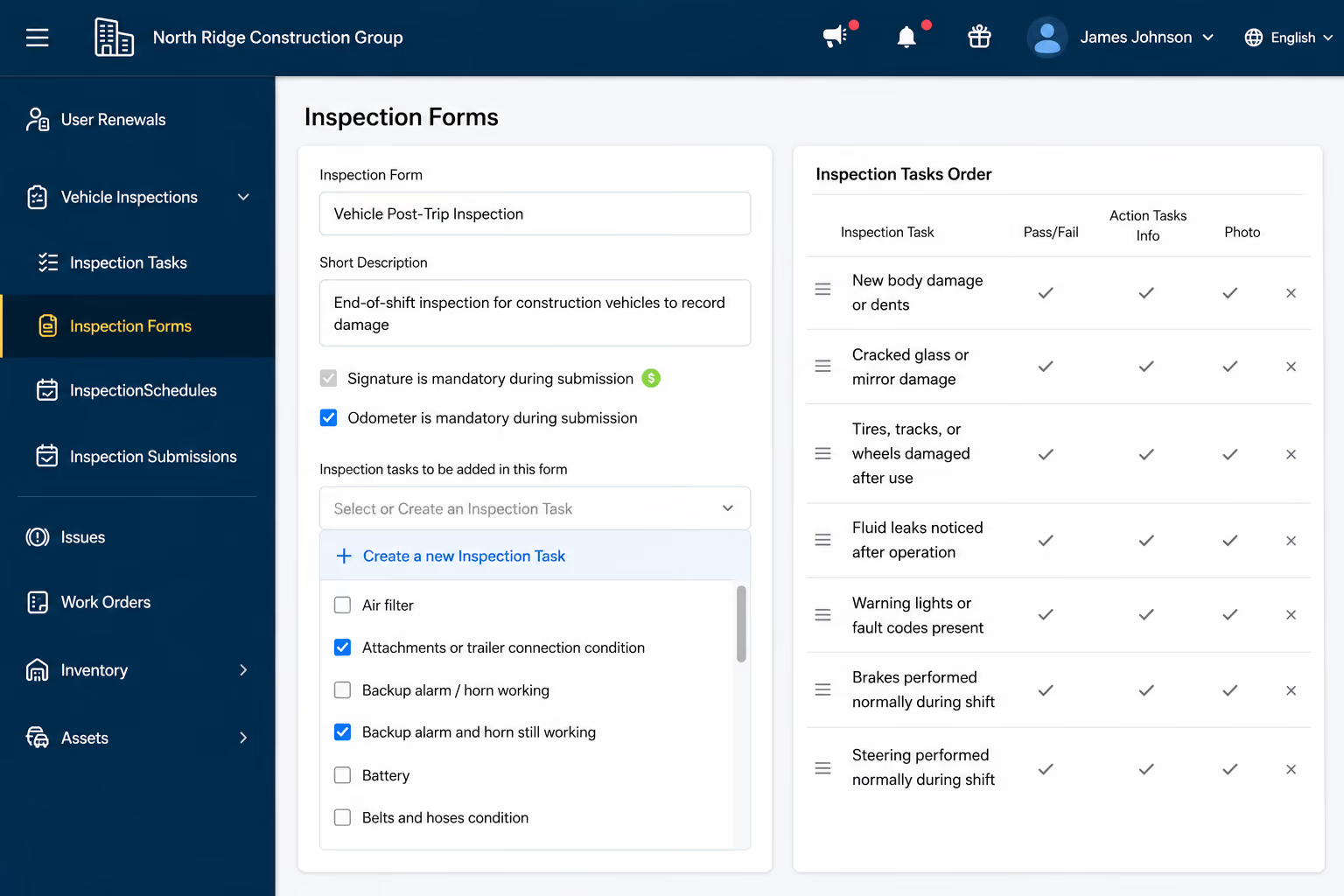
Separate inspection forms for trucks, heavy equipment, and attachments
Photos and notes attached to any failed item
A failed item opens an issue against that asset automatically
Operators only see the assets assigned to them
Inspection form in Simply Fleet construction fleet management software
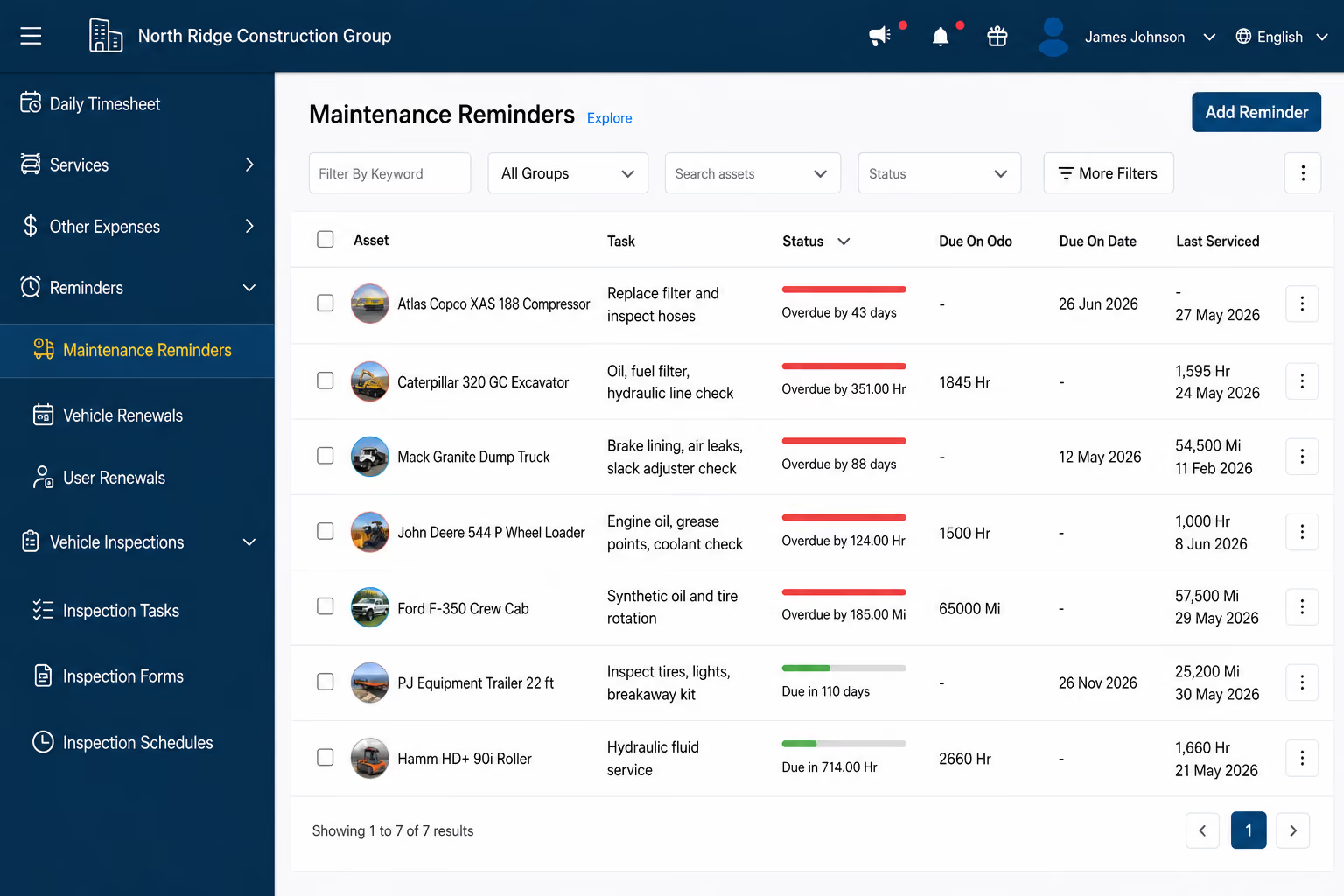
Preventive maintenance schedule in Simply Fleet construction fleet management software
CONSTRUCTION EQUIPMENT MAINTENANCE SOFTWARE

A 250 Hour Service Fires on Accumulated Hours

Fewer machines off the job for something you could have planned.

Equipment burns hours while it is standing still, which is why a calendar date is a poor proxy for wear. Set the interval against the meter the asset actually runs on and Simply Fleet tracks what is due, what is overdue, and previews the next five services so you can plan around jobsite commitments.

Intervals by engine hours, by mileage, by date, or in combination
Whichever threshold arrives first triggers the reminder
Notifications reach the admin, the assigned operator, and that operator’s manager
Due service can open a work order automatically and assign a technician
Logging the service resets the reminder and recalculates the schedule
PARTS INVENTORY AND FLEET COSTS

Cost Per Machine Builds Itself as Work Orders Close

Answer what that machine cost you without a week of digging.

Fuel, parts, labor, service, and expenses record against the asset that consumed them. You are not waiting on someone to pull it together. When the question is whether the 2016 loader earns another rebuild, the number is already there.
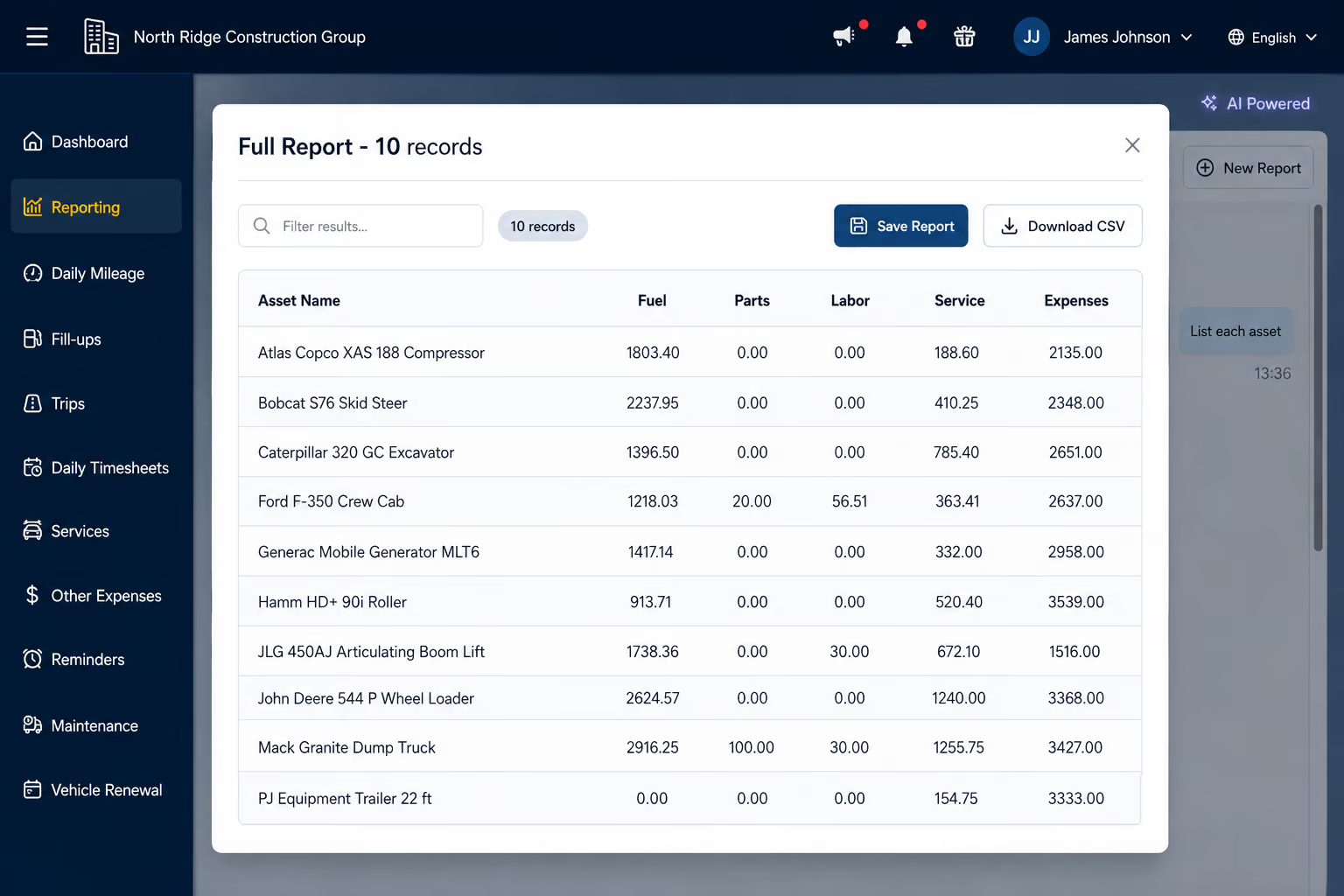
Batch tracking and barcode scanning on parts
Stock decrements automatically when a part is issued to a work order
Total cost of ownership by asset, by group, or by jobsite
Export any report to PDF or CSV
Cost per asset report in Simply Fleet construction fleet management software

From Challenges to Fleet Success

What Construction Supervisors  Say About Us

“Simply Fleet works! I like the customizable inspection forms and the regular maintenance reminders. We use this in our company daily and it exceeds the limits of the functions we need it for”

Brandon Roberson

Inventory Control Manager,
Lowe Electric Supply
“In my 19 years working in the transport industry, Simply Fleet is the ONLY fleet maintenance software program that I have come across that is user friendly, adaptable to my operations, accurate with reporting and very cost effective saving the company a lot in wasted fuel and maintenance costs

Shaun Kleynhans

Operations Manager, Transbus Africa
“We are saving 3 hours a week by shifting from spreadsheets and can already see the benefits from looking at the dashboard to monitor the costs and check on reminders in just 2 months of time.

Edward Turabian

Purchase Manager, Australian Professional Shopfitters
One Stop vehicle maintenance solution at rightly price
If you really want to manage a medium/big fleet then its a good solution, all you need to start with is the complete track records of your fleet. If update you maintenance track daily then this application helps you manage a big fleet of vehicles seamlessly.”

Amey S

Director Transportation & Trucking, GOI Car
Very happy to have found something streamlined and simple-exactly what we were looking for and needed/wanted. We needed something affordable, easy to use, and easy to deploy across a number of employees. This is the first software/platform that has everything we need including a mobile app.”

Tessa W

Business Operations Manager, Ledyard Homes
“Simply fleet is very modern compared to old way of using log books for fuel management. Fleet and fuel management are most impactful. The product is very easy to use. The integration with our existing business processes is easy.

Pearsons K

Operations Manager

What our clients say

5 star ratings
Based on reviews on
Simply Fleet Capterra Reviewsimply fleet google play reviewSimply Fleet G2 Reviewsimply fleet software advice reviewSimply Fleet Appstore Review

Keep Your Construction Fleet Ready for the Next Job

See how Simply Fleet helps you manage inspections, preventive maintenance, work orders, fuel records, and asset costs in one place.
Fleet Manager looking happy with Simply Fleet's solution
Thank you! Your submission has been received!
Oops! Something went wrong while submitting the form.
FAQ

Construction Fleet Management Questions

What is construction fleet management software?

Construction fleet management software tracks the vehicles and heavy equipment a contractor runs across jobsites. It centralizes inspections, preventive maintenance schedules, work orders, parts, fuel, and service history so every asset has one record. Contractors use it to keep service on schedule and to see what each machine costs to run.

How is construction fleet management software different from general fleet software?

Construction fleet software has to handle assets that are not measured in miles. Excavators, loaders, and generators accumulate engine hours, and they move between jobsites rather than following fixed routes. Software built purely around odometers and routes tracks those assets separately or not at all. Simply Fleet gives each asset its own primary meter so mileage based and hour based assets sit in one system.

How do contractors schedule preventive maintenance on engine hours?

Engine hour scheduling sets a service interval against accumulated running hours, because heavy equipment burns hours while stationary and distance is a poor proxy for wear. In Simply Fleet, set an asset’s primary meter to Hours and its intervals run on hours, for example a 250 hour service. Hour and date intervals can be combined, with the earlier threshold triggering.

How do contractors track maintenance on mixed fleets of vehicles and heavy equipment?

Mixed fleets are tracked by holding every asset as the same kind of record and running one shared workflow across all of them. In Simply Fleet, on road vehicles schedule on mileage, heavy equipment schedules on engine hours, and both use the same inspection forms, work orders, and cost records. That produces one service history per machine covering the truck fleet and the iron.

What construction equipment can Simply Fleet track?

Simply Fleet tracks excavators, loaders, dozers, skid steers, cranes, and trailers alongside pickups and service trucks. Smaller assets such as generators, compactors, and hand tools are covered by the Small Equipment add on.

How do operators complete equipment inspections from the jobsite?

Operators complete inspection forms on a phone before or after a shift, marking each item pass or fail and attaching photos to any failure. In Simply Fleet, a failed item opens an issue against that asset automatically, and that issue becomes a work order without re entering the details.

How does construction fleet management software reduce equipment downtime?

Downtime drops when scheduled service happens on time and field reported defects reach a mechanic the same day. Preventive maintenance reminders fire before service is due, failed inspections become issues, issues become work orders, and closing a work order writes the service record and resets the reminder.

How do contractors calculate cost per asset on a construction fleet?

Cost per asset is calculated by recording fuel, parts, labor, service, and other expenses against the specific machine that consumed them, then comparing totals across similar assets. Simply Fleet builds this as work orders close and fuel entries are logged, which is what supports repair versus replace decisions and total cost of ownership reporting.

How do fuel and service records get in without an admin typing them?

Fuel and service entries can be created by photographing the receipt, which the app reads to fill in cost, quantity, and vendor. WEX fuel card transactions import automatically as a fuel card add on. Both reduce the amount of typing a field crew has to do for records to stay complete.

Which telematics systems does Simply Fleet integrate with?

Simply Fleet integrates with Geotab, Samsara, Verizon Connect, and Motive. With auto update enabled, daily mileage syncs each night and feeds mileage based maintenance reminders. Live GPS tracking and geofencing remain with the telematics provider.

Does Simply Fleet work across multiple jobsites?

Simply Fleet groups assets by site, crew, or division, and every report filters by group. Operators see only the assets assigned to them, so a foreman on one jobsite is not scrolling the whole fleet.

How do we migrate from our current fleet system without losing service history?

Migration works by importing the records you already hold rather than re entering them. Assets, past service history, and open maintenance reminders import into Simply Fleet by CSV with a column mapping wizard. There is no hardware to install, so most fleets are running the same week they import.

Related Blogs and Articles