Inspections & DVIRs
Build checklists, schedule inspections, collect field evidence and preserve completed submissions.


Keep inspections, renewals, maintenance and compliance records in one system. Run DVIR-ready inspections, track registration, insurance, permits and driver document expirations, turn failed inspections into repair work, and keep the records your team needs organized and accessible.
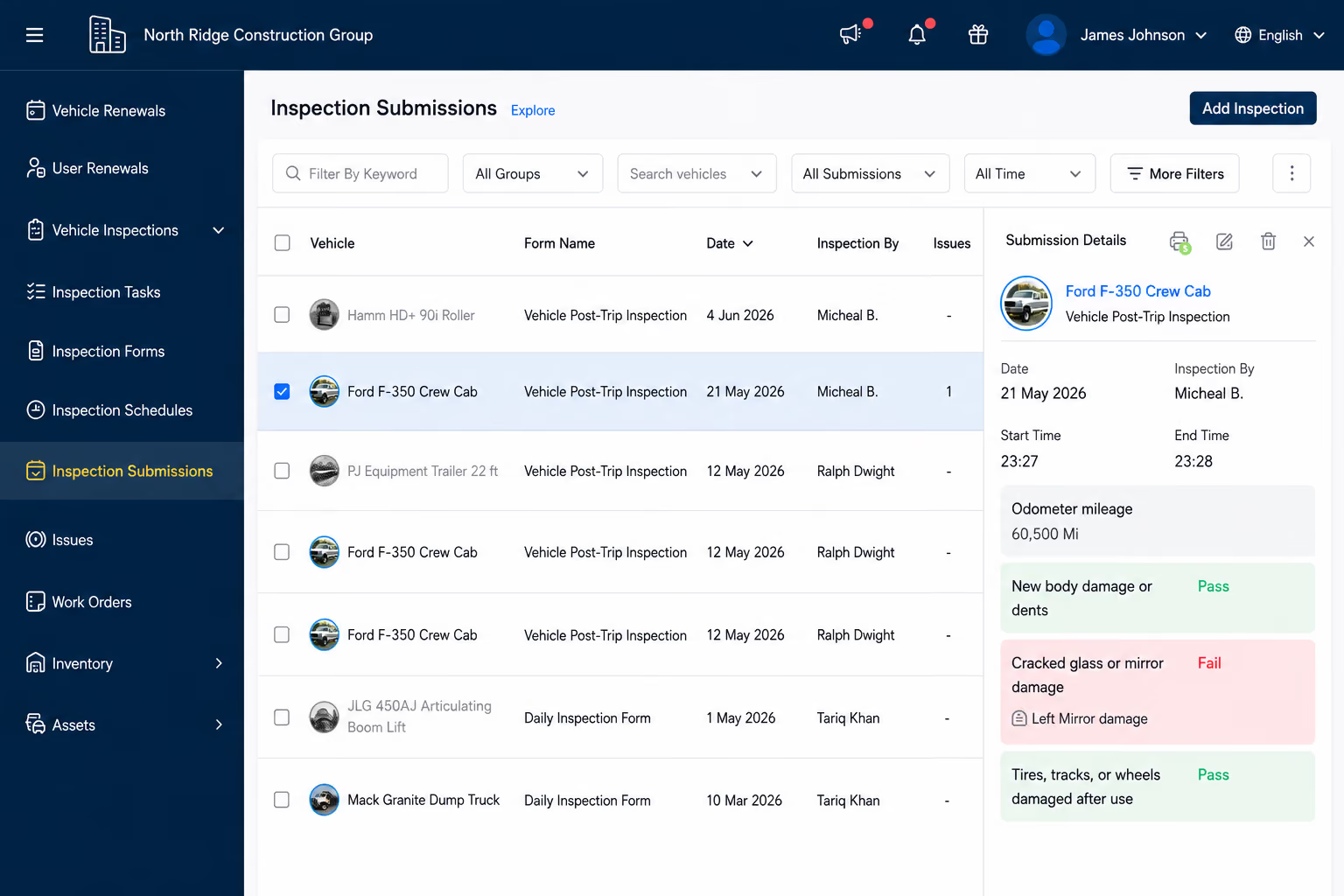
Vehicle renewals
Registration, insurance, permits and recurring vehicle compliance items.
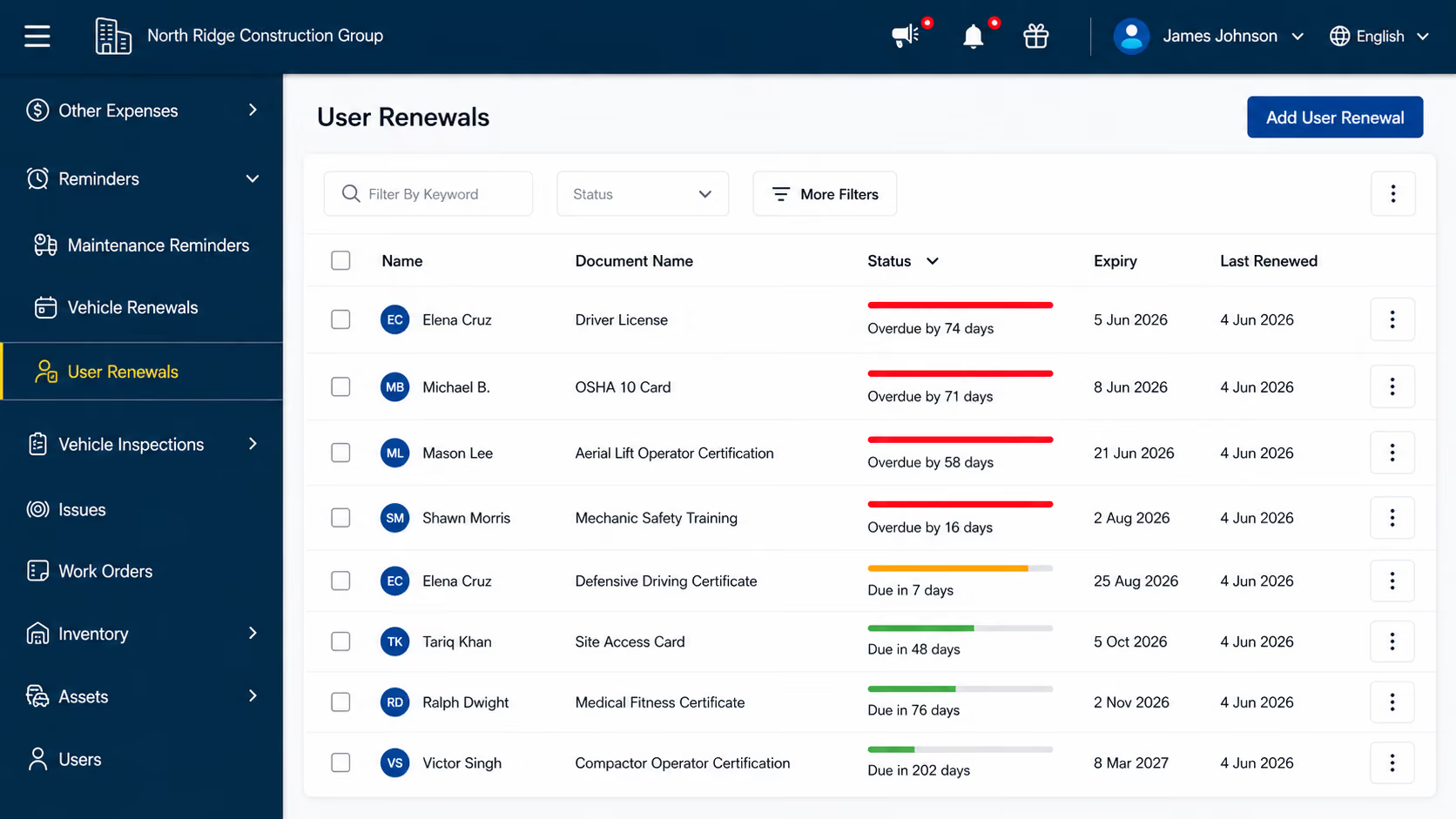
User renewals
Driver licenses, certifications, medical certificates and other user documents.
DVIR-ready inspections
Custom forms, schedules, photos, pass/fail checks, signatures and odometer capture.
Corrective action
Failed inspections can create issues that move into repair and service history.
Simply Fleet brings vehicle inspections, renewal deadlines, driver document tracking, maintenance records and supporting documents into one connected system—so your team can stay ahead of compliance work without relying on scattered spreadsheets and reminders.
Build checklists, schedule inspections, collect field evidence and preserve completed submissions.
Track vehicle renewals and user-document expiration dates with configurable advance notifications.
Move failed inspection items into issues, priorities, out-of-service decisions and work orders.
Keep vehicle documents, inspection history, issues, work orders and service records searchable and exportable.
Manage inspections, maintenance, renewals and supporting documents in one place, with records connected to the vehicles and people they belong to.
| Compliance area | Simply Fleet coverage |
|---|---|
| Vehicle inspections / DVIR workflows | Supported — custom forms, recurring or one-time schedules, pass/fail, photos, signatures, odometer capture and inspection history. |
| Vehicle renewal tracking | Supported — registration, insurance, permits and similar recurring vehicle renewals with notifications and renewal history. |
| Driver / user document expirations | Supported — licenses, certifications, medical certificates and other user documents with expiration tracking and advance reminders. |
| Defect and corrective-action tracking | Supported — failed inspections can create issues; issues can be prioritized, marked out of service and converted into vehicle work orders. |
| Maintenance and repair records | Supported — reminders, services, work orders, technician activity, parts, labor, attachments and completed service history. |
| Vehicle document storage | Supported — upload registration, insurance and other supporting files with details such as expiration date, reference number and notes. |
Simply Fleet focuses on vehicle, inspection, maintenance, renewal and document compliance workflows. Fleets may use specialized systems for other DOT/FMCSA requirements such as ELD/HOS management.
Go beyond simple expiration dates. Track each recurring vehicle renewal with its own due date, reminder settings, notification recipients and renewal history.
Track upcoming renewals. Manage registrations, insurance, permits and other recurring vehicle requirements with clear due dates and status.
Notify the right people. Set advance reminders and choose who should be notified before a renewal is due.
Keep renewal history current. Record the renewal expense to reset the reminder and calculate the next due date.
Track time-sensitive documents for each driver or employee, keeping expiration dates, reminders and supporting files together.
Track by person. Monitor driver licenses, certifications, medical certificates and other user-related documents.
Get advance notice. Set the expiration date, choose the reminder lead time and notify additional recipients when needed.
Keep the record current. Store the supporting document and mark it renewed when it is updated.
Keep registration, insurance and other supporting files attached to the vehicle record where your team can find them.
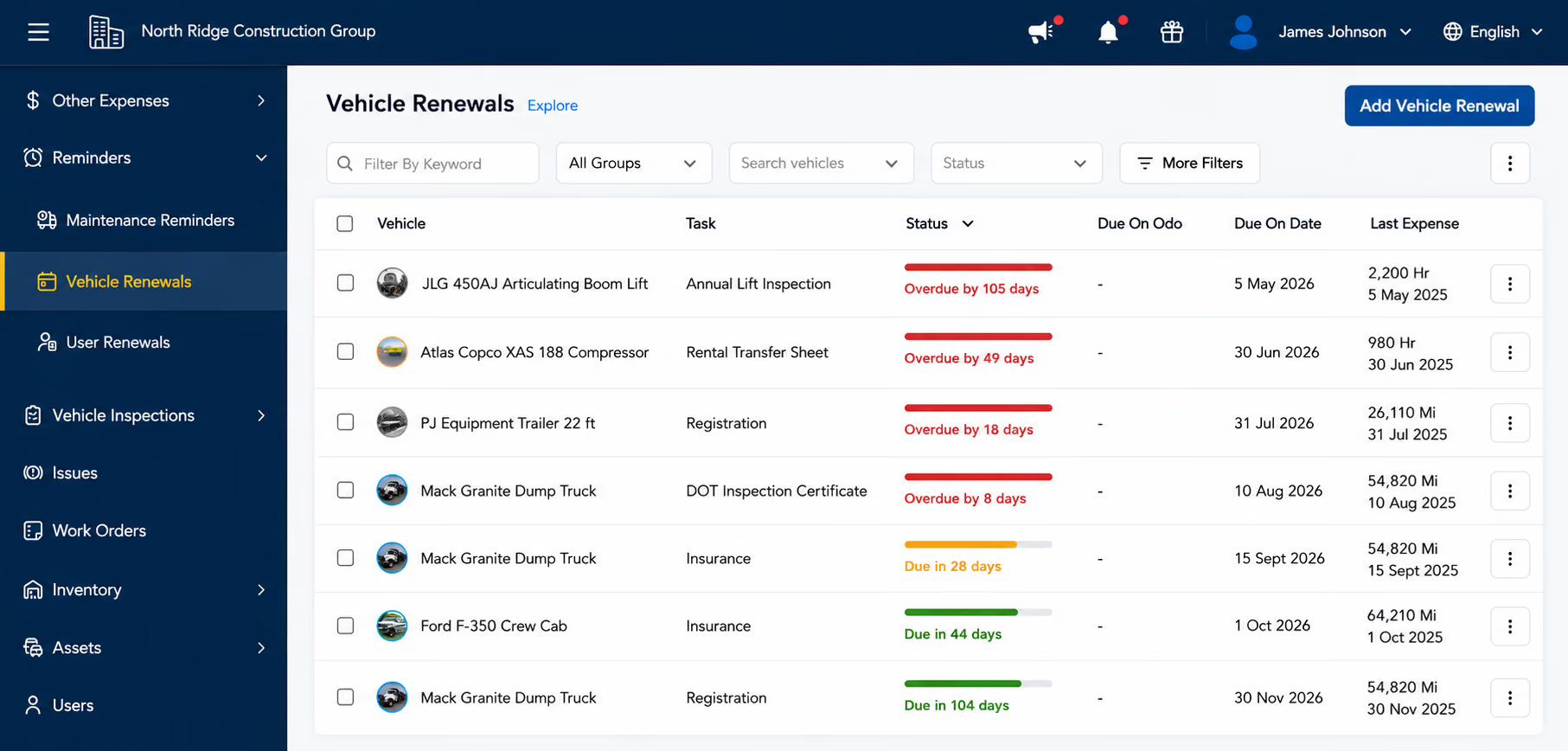
Build inspection workflows around your vehicles and operating requirements, then keep every completed DVIR or inspection in the vehicle's history.
Build the checklist. Create DVIR, pre-trip, weekly or other forms with pass/fail, information and photo tasks.
Capture the evidence you need. Require photos on failed checks and make signature or odometer capture mandatory when needed.
Keep inspections on schedule. Assign recurring or one-time inspections with advance notifications.
Simply Fleet connects inspection defects directly to corrective maintenance, so issues don't get lost between inspection and repair.
The driver completes the assigned inspection and records pass/fail results, notes or photos.
Failed inspections can create issues automatically with the source, priority and supporting details retained.
Mark the vehicle out of service when needed, convert the issue into a work order and assign a technician.
Parts, labor, notes and attachments stay with the repair; closing the work order records the completed work in the Service Log.
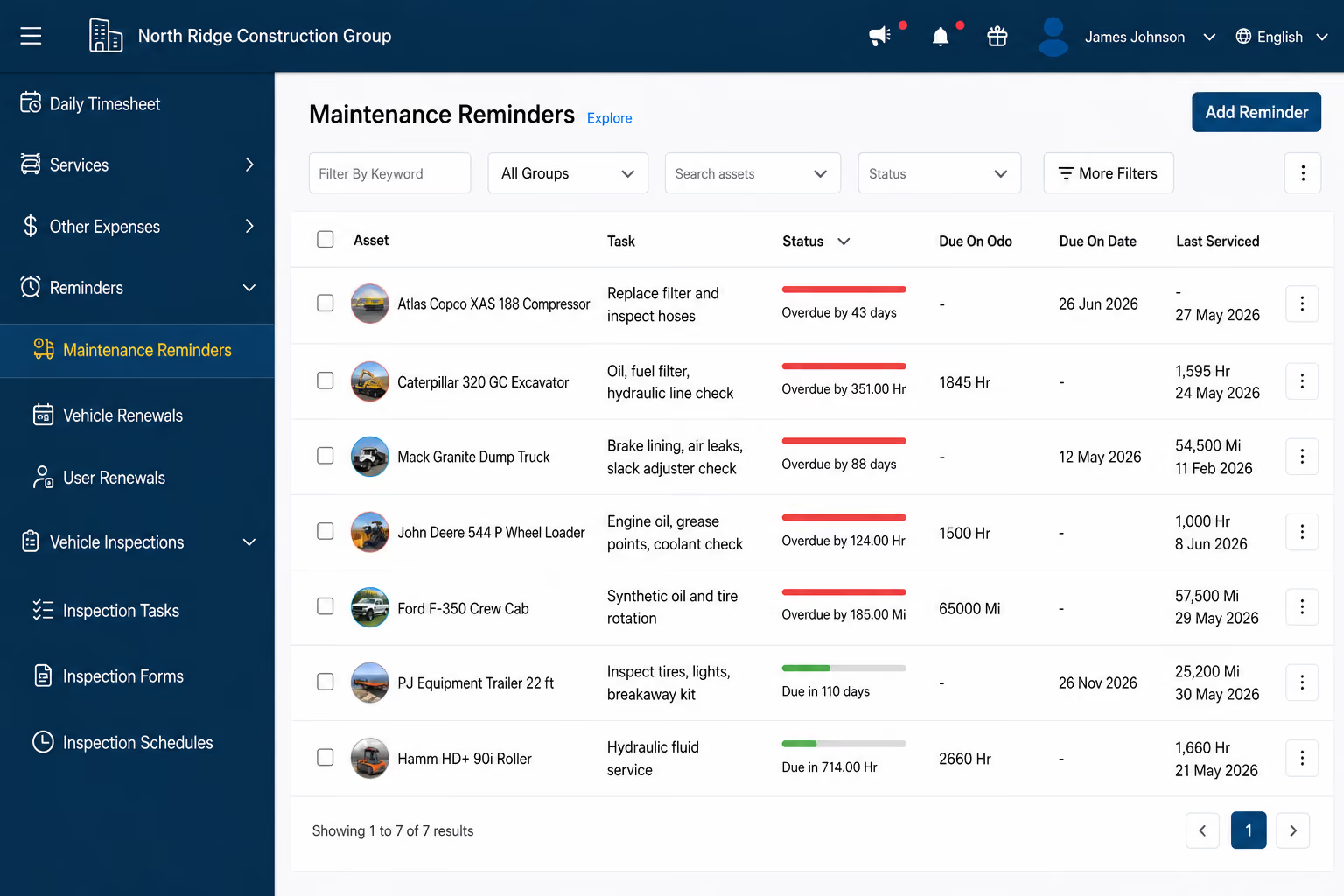
Keep the full maintenance trail together—from upcoming service to completed work and supporting records.
See what is due. Track upcoming, due-soon and overdue maintenance with date or meter-based schedules.
Move due work forward. Send advance alerts and automatically create work orders for scheduled service when configured.
Keep the history current. Completed service updates the last-serviced record and recalculates the next due schedule.
When records are requested, finding them shouldn't become a project. Keep inspections, repair evidence, maintenance history and supporting documents organized and easy to retrieve.
Why organized records matter: FMCSA Part 396 includes recordkeeping requirements for vehicle inspection, repair and maintenance records. Keeping those records organized makes them easier to retrieve when requested. Review FMCSA guidance.
Answers to common questions about Simply Fleet's inspection, renewal and compliance workflows.
Vehicle Renewal Reminders can be used for registration, insurance, permits and similar recurring vehicle-related compliance items. You can configure advance notification, choose additional recipients, filter the renewal list and export it as PDF or CSV.
Yes. Simply Fleet's inspection forms can be used for DVIR, pre-trip and other inspection processes. Forms support pass/fail, information and photo tasks, plus optional mandatory signature and odometer capture. Inspection schedules can be recurring or one-time.
A failed inspection can create an issue automatically. The issue can be prioritized, the vehicle can be marked out of service, and an Admin or Manager can convert the issue into a work order and assign it to a technician. Closing the work order records the completed work in the Service Log.
Simply Fleet can help keep inspection submissions, vehicle documents, issues, work orders, maintenance reminders and service history organized and retrievable. Several operational lists can also be exported as PDF or CSV. The software supports record organization; it does not guarantee that a carrier satisfies every applicable DOT/FMCSA requirement.
No. Simply Fleet focuses on inspections, maintenance, vehicle and user-document renewals, and related records. Fleets that require HOS/ELD, drug and alcohol program management, or complete driver qualification workflows should use appropriate specialized systems alongside Simply Fleet.
Compliance disclaimer: Simply Fleet provides tools for organizing inspections, maintenance, renewals and compliance-related records. Fleet operators remain responsible for determining and meeting the requirements that apply to their vehicles, drivers and business.