PREVENTIVE MAINTENANCEΒ SOFTWARE

Keep every service on track without chasing people

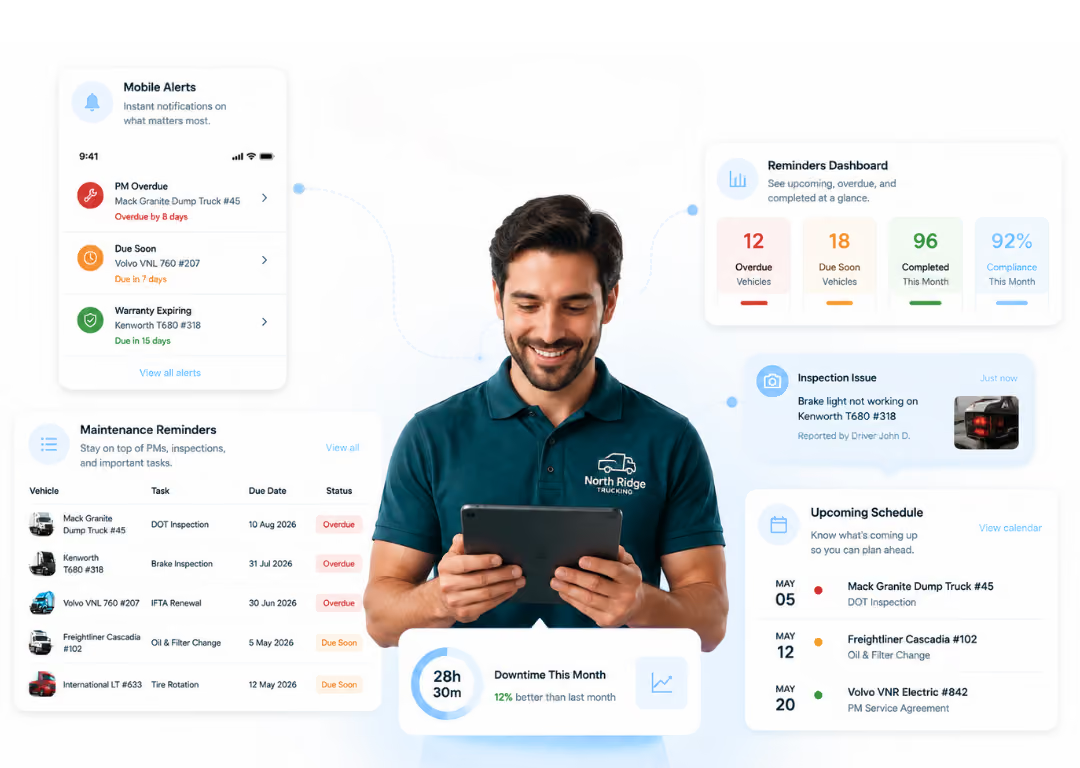
Set service reminders by mileage, date, or both. Simply Fleet tracks what is due, alerts your team before it becomes overdue, and resets the next service after the work is logged.
Built for teams that need maintenance reminders, inspections, work orders, parts, and service history in one place.
5 star ratings
Based on reviews on
Simply Fleet Capterra Reviewsimply fleet google play reviewSimply Fleet G2 Reviewsimply fleet software advice reviewSimply Fleet Appstore Review
Maintenance reminders, inspections, work orders, parts, and service history, all in one place.
β˜… 4.7 Β· G2
β˜… 4.8 Β· Capterra
75+ countries
From $2/vehicle/month
PM Risk Check
How exposed is your fleet to missed maintenance?
Five questions. Find out where your PM process may still depend on memory or manual follow-ups.
Question 1 of 5
Do you get reminders before a vehicle is due for service?
Not a calendar reminder someone set manually. A real maintenance reminder tied to the vehicle.
Are your reminders based on mileage, date, or both?
This helps you track service by actual usage, time, or a mix of both.
Does the next reminder reset after the service is logged?
Or does someone still have to update the next due mileage or date manually?
Can a due service become a work order?
A reminder should lead to action, not sit as another item someone has to chase.
Can you see full service history for a vehicle quickly?
No digging through folders, invoices, texts, or old spreadsheets.
How it works

Preventive maintenance should move in a loop, not sit in a spreadsheet.

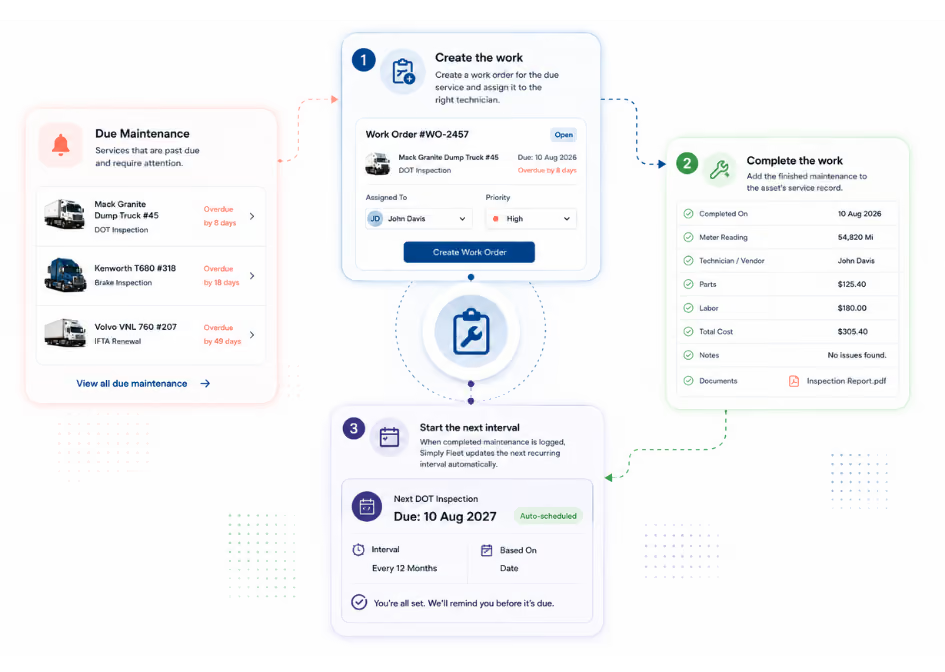
Set the rule, track the vehicle, notify early, complete the work, and reset the next service. Repeat.

1

Set

Create service schedules by mileage, date, or engine hours. Preview upcoming schedules before saving.

2

Track

See what is upcoming, due, or overdue without checking separate sheets or calling anyone.

3

Notify

Automatic alerts fire before a service becomes late, based on days or mileage remaining.

4

Fix

Create a work order from the due reminder, assign it to a technician, and track it to completion.

5

Reset

Once the service is logged, the next reminder updates automatically. No manual entry required.

Features Built around the jobs your fleet manager actually has to do. Each feature solves one real problem. Not a list of settings.
Maintenance scheduling Set service reminders without rebuilding your process. Add reminders for oil changes, inspections, tire rotation, brake checks, or any task your fleet repeats. Set it once and the system takes it from there.
  • Set by mileage, date, engine hours, or all three
  • Preview upcoming schedules before saving
  • Adjust the next due point when needed
  • Bulk apply schedules across vehicle groups
Reminder setup
Preview
Oil change
5,000 miles or 180 days
500 miles or 14 days
42,500 miles · May 20, 2026
Maintenance due list
This week
Truck 108Oil changeDue
Van 214Tire rotationUpcoming
Pickup 42Brake checkOverdue
Trailer 7Annual inspectionUpcoming
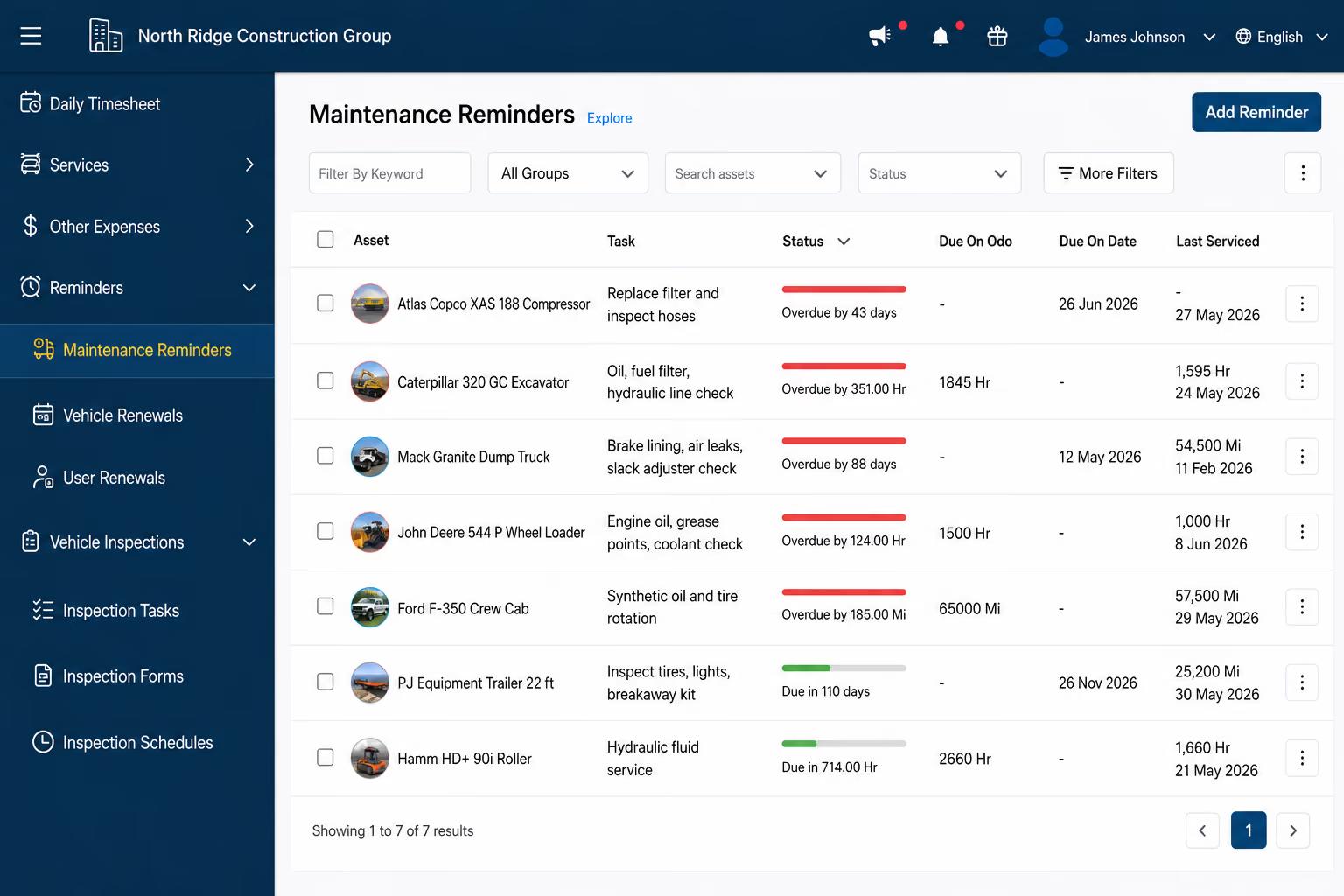
Due and overdue visibility Know what needs attention before a vehicle sits idle. Your team should not have to ask what is due this week. The answer should already be visible to everyone, not locked in one person's spreadsheet.
  • See upcoming, due, and overdue in one shared view
  • Filter by vehicle, group, location, or status
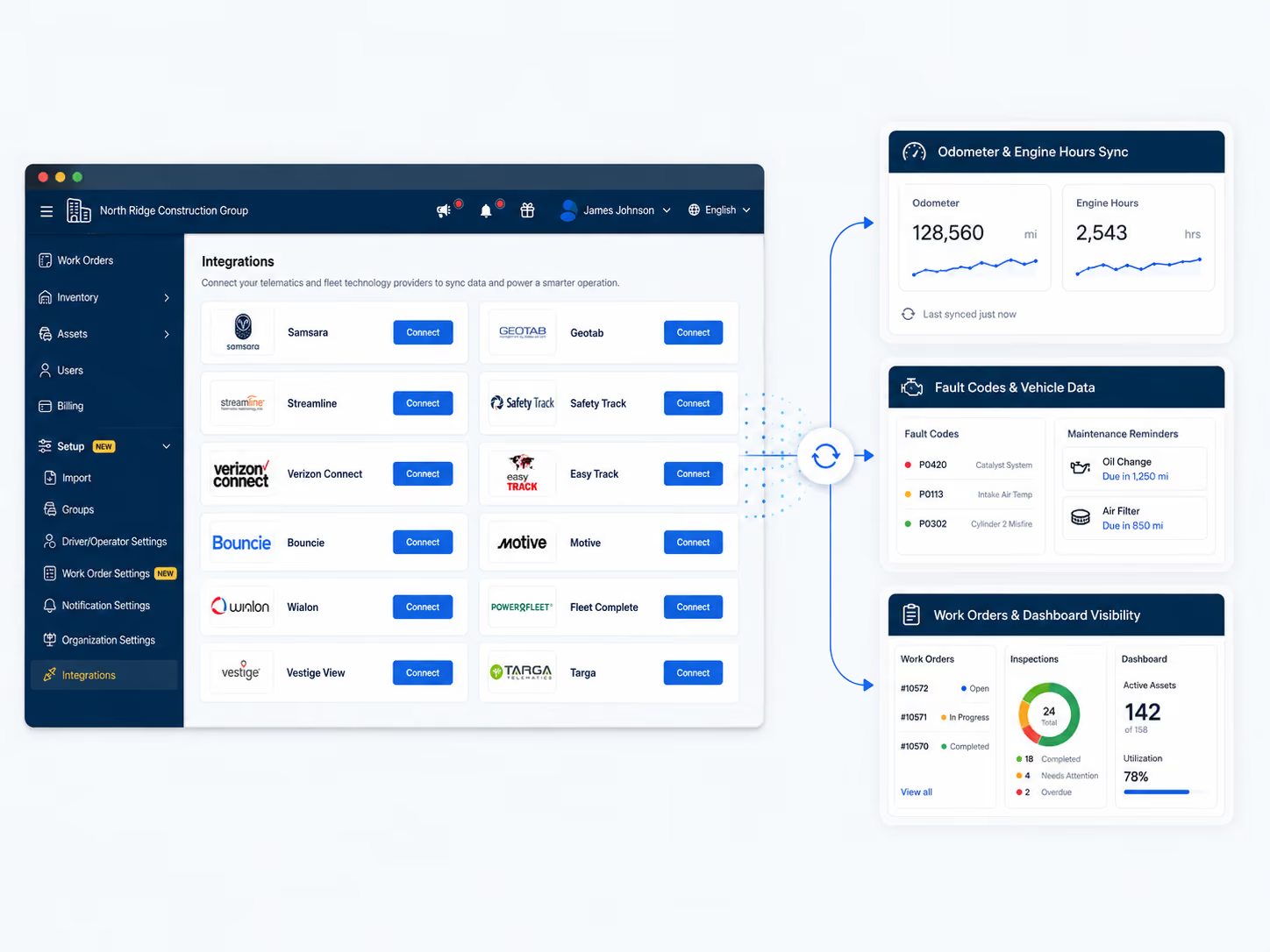
  • Synced mileage keeps reminders close to real usage
  • Shared visibility instead of one-person memory
Work execution Turn a due reminder into work your team can complete. A reminder is only useful if it leads to action. Create digital work orders, assign jobs, and track completion without switching tools.
  • Create work orders directly from due service reminders
  • Assign to technicians and track job status
  • Log labor, parts, cost, and notes in one place
  • Completed work updates the vehicle record automatically
Work order
In progress
1
Service dueOil change due for Truck 108
2
Work order createdAssigned to technician
3
Parts and labor loggedFilter, oil, time, and notes captured
4
Service history updatedNext due reminder resets automatically
Vehicle service history
Truck 108
Apr 18Oil change$214
Mar 03Brake check$480
Jan 22Annual inspection$90
Dec 10Tire rotation$165
Service history Every completed service tied to the right vehicle, permanently. When someone asks what was done on a vehicle, your team should not have to search through folders, old invoices, and messages to find out.
  • Log date, mileage, vendor, notes, and cost per service
  • Attach invoices or service documents
  • Full history visible on every vehicle profile
  • Use history to plan the next maintenance cycle
What fleet managers say

From the people running fleets like yours.

Real fleets. Real situations. No marketing speak.

"

We used to rely on one person to know what was due. If they were out, nothing got done. Now the whole team can see what is coming up, what is overdue, and what got serviced last week without asking anyone. The visibility alone was worth switching.

R
Ralph Dwight
Fleet manager, Healthcare fleet · 180 vehicles
"

We had 400 pieces of equipment tracked in spreadsheets and were paying an outside service just to stay on top of maintenance schedules. Simply Fleet replaced all of that. The reminders fire automatically and the history is right there on the asset. We stopped chasing it.

M
Michael B.
Operations, Agriculture fleet · 400+ assets
Pricing
Simply Fleet starts at $2 per vehicle, per month.
Free up to 5 vehicles. No contract. Set up in a day.
Connected maintenance

PM works better when it connects with the rest of your fleet.

Simply Fleet is not just a reminder tool. Preventive maintenance links directly to inspections, work orders, parts, issues, and telematics.

PM + Inspections

Find defects during vehicle inspections before they become bigger repairs.

View inspections →

PM + Work Orders

Turn planned maintenance into assigned work with notes, parts, and cost.

View work orders →

PM + Issues

Move reported defects into a repair workflow instead of losing them in messages or texts.

View issues →

PM + Parts

Track which parts were used and keep maintenance cost tied to each vehicle.

View parts →

PM + Telematics

Synced mileage from Geotab, Samsara, Motive, and Verizon Connect triggers PM reminders based on actual usage.

View integrations →
Comparison

Still managing maintenance on a spreadsheet or whiteboard?

Here is what the same task looks like in your current process versus Simply Fleet.

PM task
Spreadsheet / paper / whiteboard
Simply Fleet
Set service intervals
Manual entry. Easy to forget or overwrite by accident.
Set by mileage, date, hours, or all three. Saved once.
See what is due
Someone has to check the sheet or board every morning.
Upcoming, due, and overdue is always visible to the team.
Alert the team
Calls, texts, sticky notes, or calendar entries that get ignored.
Automatic alerts before service becomes late. No action needed.
Create repair work
Verbal handoffs, separate notes, jobs that fall between the cracks.
Work orders created from due reminders. Assigned and tracked.
Reset next service
Someone must update the mileage or date manually after every job.
Next service resets automatically after the job is logged.
Find service history
Search invoices, email threads, and old files to find anything.
Full vehicle history in one place, searchable in seconds.
Expert note

Why most PM programs fail before they start

"Most PM programs do not fail because teams ignore maintenance. They fail because the process depends on someone remembering what is due, updating the next service, and following up manually. Remove that dependency and the fleet runs itself."

Jon White Fleet lifecycle, predictive analytics, and telematics consultant

From Challenges to Fleet Success

Switching path

Move to Simply Fleet without rebuilding your whole process.

Whether you are on paper, spreadsheets, or another tool, the path in is straightforward.

From spreadsheets

Import vehicles via CSV, add current mileage, and set up the PM tasks your team already tracks. Most fleet managers are running within a day. You do not need to migrate years of history to start getting value.

From paper or whiteboards

Start with your active vehicles and upcoming services. Move your most critical reminders in first. You do not need to digitize the past. The system starts tracking from the moment you set it up.

From Fleetio or other software

Bring over vehicles, key schedules, and recent service history. Then map your current workflows into Simply Fleet at your own pace. See how Simply Fleet compares to Fleetio.

Step 1
Add vehicles
Step 2
Set PM tasks
Step 3
Add users
Step 4
Start inspections
Step 5
Create work orders
Step 6
Review after 30 days

What Fleet Managers Say About Us

β€œSimply Fleet works! I like the customizable inspection forms and the regular maintenance reminders. We use this in our company daily and it exceeds the limits of the functions we need it for”
Testimonial Image Brandon
Brandon Roberson
Inventory Control Manager,
Lowe Electric Supply
β€œOne Stop vehicle maintenance solution at rightly price
If you really want to manage a medium/big fleet then its a good solution, all you need to start with is the complete track records of your fleet. If update you maintenance track daily then this application helps you manage a big fleet of vehicles seamlessly.”
Testimonial Image Amey
Amey S
Director Transportation &Β Trucking, GOI Car
β€œIn my 19 years working in the transport industry, Simply Fleet is the ONLY fleet maintenance software program that I have come across that is user friendly, adaptable to my operations, accurate with reporting and very cost effective saving the company a lot in wasted fuel and maintenance costs”
Testimonial Image Shaun
Shaun Kleynhans
Operations Manager, Transbus Africa
β€œVery happy to have found something streamlined and simple-exactly what we were looking for and needed/wanted. We needed something affordable, easy to use, and easy to deploy across a number of employees. This is the first software/platform that has everything we need including a mobile app.”
Testimonial Image Tess
Tessa W
Business Operations Manager, Ledyard Homes
β€œWe are saving 3 hours a week by shifting from spreadsheets and can already see the benefits from looking at the dashboard to monitor the costs and check on reminders in just 2 months of time.”
Testimonial Image Edward
Edward Turabian
Purchase Manager, Australian Professional Shopfitters
β€œSimply fleet is very modern compared to old way of using log books for fuel management. Fleet and fuel management are most impactful. The product is very easy to use. The integration with our existing business processes is easy.
”
Testimonial Image Pearson
Pearsons K
Operations Manager,

Ready to stop chasing missed maintenance?

‍Set up service reminders, track what is due, assign work, and keep every vehicle's history in one place. Starts at $2 per vehicle per month. Free up to 5 vehicles.
Fleet Manager looking happy with Simply Fleet's solution
Thank you! Your submission has been received!
Oops! Something went wrong while submitting the form.

Frequently Asked Questions

Still have questions?

Reach out to ask us and learn more on how Simply Fleet can help you
Contact Us
What is preventive maintenance software for fleets?

Preventive maintenance software for fleets is a tool that automatically schedules and tracks routine vehicle service tasks such as oil changes, inspections, and tire rotations. It sends reminders before service is due, generates work orders, and stores complete service history for every vehicle in your fleet.

How does Simply Fleet help reduce fleet downtime?

By sending automated maintenance reminders, tracking vehicle issues, and streamlining repairs, Simply Fleet ensures vehicles stay road-ready.

Can I track service costs with Simply Fleet?

Yes! Log parts, labor, and service expenses per vehicle to monitor total maintenance spending.

Can I customize fleet reports and alerts?

Yes! Simply Fleet lets you customize reports and set up alerts for maintenance, document expirations, tailored to your fleet’s needs.

Does Simply Fleet help with DOT compliance?

Absolutely. Store inspection records, track service history, and generate reports to ensure you’re audit-ready.

Can drivers and technicians update maintenance records on the go?

Yes! Drivers can report issues, technicians can log completed work, and fleet managers can track everything from any device.

Related Blogs and Articles