

How to Identify High-Cost Fleet Vehicles Across Multiple Locations
Key Takeaways
- Fleet managers lose hours every week on repetitive admin work
- Manual processes increase errors, delays, and costs
- Key tasks to automate include data entry, maintenance, compliance, fuel tracking, reporting, and inventory
- Automation improves accuracy, visibility, and decision-making
- Modern fleet management requires systems built for scale
Fleet managers today wear too many hats. From tracking vehicles and drivers to managing compliance, maintenance, fuel, and reports, the day often disappears into repetitive admin work. The problem is not the workload alone. It’s how much of it is still done manually.
Automation is no longer a “nice to have” in fleet operations. It is the difference between reacting to problems and running a proactive, efficient fleet.
This article breaks down the most time-wasting tasks every fleet manager should automate, why they matter, and how automation frees you to focus on strategy, safety, and cost control.
Why Fleet Managers Lose So Much Time on Manual Tasks
Most fleet operations grow faster than their processes. What starts as a few vehicles tracked on spreadsheets soon becomes a complex system of emails, paper logs, phone calls, and reminders.
Manual processes usually lead to:
- Duplicate data entry
- Missed maintenance schedules
- Delayed compliance filings
- Inaccurate reports
- Stressful last-minute firefighting
Automation replaces fragmented workflows with a single source of truth, saving time while improving accuracy.
What are the Time-Wasting Tasks Every Fleet Manager Should Automate?
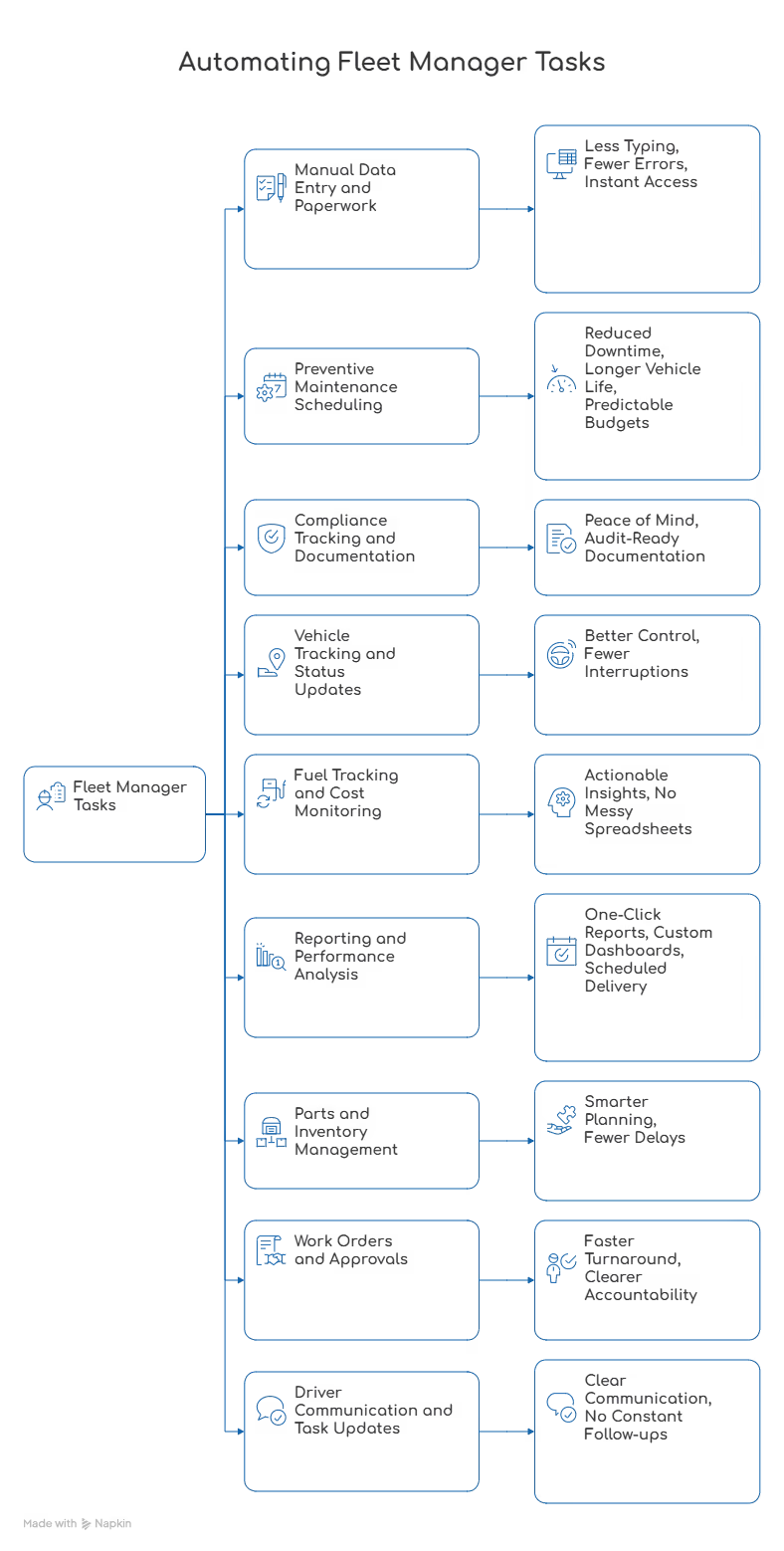
Many daily fleet management tasks are essential but highly repetitive. When handled manually, they consume time, slow operations, and increase the risk of errors. The following tasks are the most common areas where automation can make an immediate and measurable impact.
1. Manual Data Entry and Paperwork
Fleet managers still spend hours entering:
- Vehicle inspections
- Fuel receipts
- Service records
- Driver logs
- Expense data
Manual data entry is slow and error-prone. One missed entry can snowball into compliance gaps or reporting issues.
What to Automate
- Digital vehicle profiles
- Automated data syncing across modules
- Centralized document storage
Result
Less typing, fewer errors, and instant access to accurate fleet data.
2. Preventive Maintenance Scheduling
Tracking service intervals manually using mileage notes or calendar reminders often leads to:
- Late servicing
- Unexpected breakdowns
- Higher repair costs
Reactive maintenance costs significantly more than preventive maintenance.
What to Automate
- Service reminders based on mileage, engine hours, or time
- Automated work order creation
- Maintenance history tracking
Key Benefits
- Reduced downtime
- Longer vehicle life
- Predictable maintenance budgets
3. Compliance Tracking and Documentation
Compliance requirements are non-negotiable, yet extremely time-consuming. Fleet managers juggle:
- Registration renewals
- Insurance documents
- Inspection records
- Driver certifications
Missing a deadline can result in fines, audits, or vehicle grounding.
What to Automate
- Expiry alerts for documents
- Digital compliance logs
- Auto-generated compliance reports
Result
Peace of mind and audit-ready documentation without last-minute stress.
4. Vehicle Tracking and Status Updates
Calling drivers or switching between systems to check vehicle status wastes time and slows decisions.
Fleet managers need visibility, not constant follow-ups.
What to Automate
- Centralized vehicle status dashboards
- Automated alerts for idle time, breakdowns, or unusual usage
Result
Better control over daily operations with fewer interruptions.
5. Fuel Tracking and Cost Monitoring
Fuel is one of the largest operating expenses. Manual tracking often hides:
- Fuel theft
- Inefficient driving habits
- Unexpected cost spikes
What to Automate
- Fuel entry logging
- Fuel efficiency calculations
- Cost trend monitoring
Why It Matters
Automation turns fuel data into actionable insights instead of messy spreadsheets.
Download Our Free Fleet Management Resources Now!
Prevent costly breakdowns and maximize uptime with our free checklist.
Download
6. Reporting and Performance Analysis
Fleet reports often take hours to compile and are outdated by the time they are ready.
Manually pulling data for:
- Vehicle utilization
- Maintenance costs
- Fuel spend
- Driver performance
…is one of the biggest time drains.
What to Automate
- One-click reports
- Custom dashboards
- Scheduled report delivery
7. Parts and Inventory Management
Managing spare parts manually often leads to:
- Overstocking
- Stockouts
- Emergency purchases
Both scenarios waste money and time.
What to Automate
- Inventory usage tracking
- Low-stock alerts
- Cost tracking per vehicle
Result
Smarter inventory planning and fewer maintenance delays.
8. Work Orders and Approvals
Creating, approving, and tracking work orders manually interrupts workflows and increases paperwork.
What to Automate
- Auto-generated work orders
- Approval workflows
- Maintenance status tracking
Result
Faster turnaround and clearer accountability.
9. Driver Communication and Task Updates
Phone calls, messages, and emails quickly become unmanageable as fleets grow.
What to Automate
- Centralized task assignments
- In-app notifications
- Maintenance and inspection reminders
Benefit
Clear communication without constant follow-ups.
What Fleet Managers Should Focus on Instead
Once routine tasks are automated, fleet managers can spend time on what actually moves the needle:
- Reducing operational costs
- Improving driver safety
- Optimizing vehicle utilization
- Planning fleet expansion
- Analyzing long-term performance trends
Why Is Simply Fleet Built for This?
Simply Fleet helps fleet managers eliminate manual work by bringing maintenance, compliance, fuel, inventory, reporting, and vehicle data into one intuitive platform. Instead of juggling spreadsheets and reminders, teams get real-time insights and automated workflows that scale as fleets grow.
If your day is still consumed by spreadsheets, reminders, and paperwork, it’s time to switch. Try Simply Fleet and see how automation can give you back hours every week.