


How to Automate Construction DOT Audits with Simply Fleet and Geotab
Key Takeaways
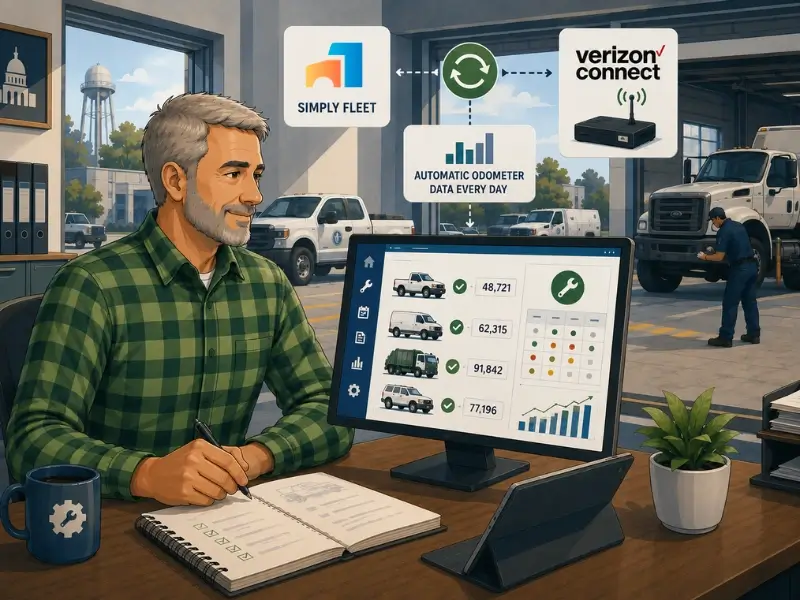
- The Simply Fleet and Verizon Connect integration updates each vehicle's odometer reading automatically, once a day, from telematics data.
- That removes manual odometer entry, which is the most common reason preventive maintenance timing slips on active fleets.
- With accurate daily mileage feeding the PM schedule, reminders trigger on real usage, so service comes due on time rather than whenever a reading is entered.
- The integration is available on Simply Fleet's Advanced plan, and Geotab and Samsara are supported alongside Verizon Connect.
- This is not live, second-by-second tracking. It is a reliable daily odometer sync, which is exactly what preventive maintenance timing actually needs.
When we were building out Simply Fleet's preventive maintenance engine, the same problem kept surfacing in customer conversations. The maintenance logic was sound. The reminders worked. But the whole system rested on one fragile input: the odometer reading. And on most fleets, that reading was being typed in by hand.
Think about what that means. You can build the most accurate PM schedule in the world, but if it is calculating against a mileage number that someone last entered three weeks ago, the schedule is quietly wrong. The service that should come due at 90,000 miles comes due whenever the manual reading happens to catch up. On a fleet running real daily miles, that gap is not academic. It is the difference between a PM done on time and a PM done late, every single cycle.
That is the problem the Verizon Connect integration solves, and it is why we built it. If a fleet is already running Verizon Connect for telematics, the odometer data already exists. There is no reason a human should be re-entering it into the maintenance system. The integration lets that data flow into Simply Fleet automatically, so preventive maintenance triggers on what the vehicle actually did, not on the last time someone remembered to update a number.
The Real Problem: PM Is Only as Accurate as the Odometer Behind It
Here is something most preventive maintenance advice skips. Everyone talks about setting the right intervals, choosing the right tasks, and building the right schedule. Almost nobody talks about the data the whole thing depends on: the meter reading. And that is the part that actually breaks.
A preventive maintenance schedule based on mileage is doing one calculation over and over: how far has this vehicle traveled since its last service, and has it reached the interval. If the mileage number is current, the calculation is right and the service comes due on time. If the mileage number is stale, the calculation is wrong, and the service comes due late by however many miles the vehicle drove between the last manual entry and now.
On a light-use fleet, manual entry can almost keep up. On a fleet running real daily miles, it cannot. A vehicle doing 300 miles a day will drift thousands of miles past its true reading in the time between manual updates. The PM schedule shows the service as not yet due. The vehicle has actually blown past the interval. Nobody is doing anything wrong, the data is just behind.
This is the same root cause behind a pattern we see constantly: fleets that run a real PM program and still experience breakdowns. I have written before about why fleets break down despite having preventive maintenance in place, and stale meter data is one of the quiet culprits. The schedule was fine. The reading feeding it was not.
What the Verizon Connect Integration Actually Does
Let me be precise about the mechanism, because precision matters more than marketing here. When Simply Fleet is connected to Verizon Connect, and the daily mileage auto-update option is enabled in the integration settings, Simply Fleet uses the telematics data to update each vehicle's daily mileage automatically. That update runs once a day, at midnight. No one types in a reading. The odometer in Simply Fleet reflects what the vehicle actually drove.
That daily update is the input the preventive maintenance engine has been waiting for. With mileage refreshed every day from real telematics data, the PM schedule is always calculating against an accurate number. Service comes due based on actual usage. The reminder fires when the vehicle has genuinely reached the interval, not whenever a human got around to entering a reading.
I want to be honest about one thing, because overselling an integration helps nobody. This is not live, second-by-second odometer streaming, and it does not need to be. Preventive maintenance does not care whether a vehicle crossed an interval at 2pm or by the end of the day. A reliable daily update is exactly the right resolution for PM timing. Calling it live would be inaccurate, and it would also miss the point: the value is in the reliability and the removal of manual work, not in the frequency.
Before and After: What Changes on the Ground
The downstream effect people miss is in the reporting. Accurate daily mileage does not just fix PM timing. It fixes every number that depends on mileage, including cost per mile and utilization. If you have ever distrusted your cost-per-mile figures, stale odometer data is often the reason, a point I get into in the discussion of vehicle mileage versus repair costs. Fix the mileage input and several reports get more trustworthy at once.
Download Our Free Fleet Management Resources Now!
Prevent costly breakdowns and maximize uptime with our free checklist.
Download
Who This Integration Is For
This integration earns its value on fleets where two things are true: you are already running Verizon Connect for telematics, and your vehicles accumulate enough daily mileage that manual odometer entry cannot realistically keep pace. If both are true, the integration removes a real source of error from your maintenance program.
- Fleets already on Verizon Connect who are still entering odometer readings into their maintenance system by hand. This is duplicated effort, and the integration eliminates it.
- Active fleets running high daily mileage, where the gap between manual readings and real usage is large enough to push PM late.
- Mixed fleets where keeping every vehicle's reading current manually is simply not feasible across the asset count.
- Fleets that need their mileage-based reporting, cost per mile and utilization, to be accurate enough to base decisions on.
If you run a small, light-use fleet and manual entry is genuinely keeping up, you may not need this yet. I would rather say that plainly than pretend every fleet needs every integration. But the moment manual entry starts slipping, and on a growing fleet it always does, this is the fix.
How It Fits the Larger Preventive Maintenance Workflow
The odometer integration is one input into a larger workflow, and it is worth seeing how it connects. Accurate mileage feeds the PM schedule. The schedule triggers a reminder. The reminder becomes a service or work order. The completed work resets the next due date. And the whole cycle is now anchored to real usage data rather than manual entry.
If you want the full picture of how the reminder-to-service-to-reset cycle works, the foundation is laid out in the guide to preventive maintenance for fleets. The Verizon Connect integration does not change that cycle; it makes the data feeding it reliable, which is what the cycle has always needed.
Setting It Up in Simply Fleet
The integration lives in Simply Fleet's telematics integration capability, which is part of the Advanced plan. Once Verizon Connect is connected and the daily mileage auto-update option is enabled in the integration settings, the odometer data begins flowing automatically. From there, the preventive maintenance engine does what it already does, only now on accurate, daily-updated mileage.
Preventive maintenance reminders run by mileage, engine hours, or date, and reset automatically after each service. With Verizon Connect feeding mileage, the mileage-based reminders run on current data. See preventive maintenance software.
Telematics integrations connect Simply Fleet to Verizon Connect, Geotab, or Samsara for automatic daily mileage updates. See the fleet integrations page.
Reporting and data analysis benefit from the accurate mileage too, since cost per mile and utilization depend on it. See reporting and data analysis.
Conclusion: Fix the Input, Not Just the Schedule
If I could go back and tell our earlier selves one thing about building a preventive maintenance system, it would be this: the schedule was never the hard part. The data feeding it was. We spent a lot of effort making the maintenance logic accurate, and all of that effort is wasted if the odometer reading behind it is three weeks stale.
That is the lesson the Verizon Connect integration is built on. A PM program does not fail because the intervals are wrong. It fails because the meter reading the intervals depend on is entered by hand and falls behind. Remove that manual step, let accurate mileage flow in automatically every day, and the schedule you already built finally runs on the data it always needed.
If your fleet is on Verizon Connect and still entering odometer readings by hand, you are doing work the integration can do for you, and carrying a source of error you do not need to carry. Connect the two, and let preventive maintenance trigger on what your vehicles actually do.
To set up the integration or see it in action, book a demo or explore Simply Fleet's fleet integrations.