




Why the Class 8 Pre-Buy Window is Closed and How to Pivot
Key Takeaways
- A repair approval workflow defines which repairs can proceed without sign-off, which need approval, and which should trigger a replacement review before work begins.
- Approval workflows fail in two directions: too loose and costs drift uncontrolled; too tight and the shop waits on sign-offs while assets sit idle.
- The fix is a threshold-based system tied to repair cost, asset class, vendor type, and repeat failure pattern, not a single blanket rule.
- Approval decisions should be informed by repair history. A five-hundred-dollar repair on an asset that has had three similar jobs in six months is a different decision than the same repair on a clean history asset.
- A connected workflow captures cost, vendor, and repair reason at the work order level, so approvals are informed and post-repair reporting is automatic.
The question I get asked most before a demo is not about features. It is some version of this: "We need controls on repair spend, but every time we add an approval step, the shop slows down. How do we fix that?"
It is a real tension, and it does not get resolved by adding more approval steps or by removing them. It gets resolved by designing the right approval structure, the one that matches your actual risk, not a blanket rule that treats a fifty-dollar oil filter the same way it treats a twelve-thousand-dollar transmission rebuild.
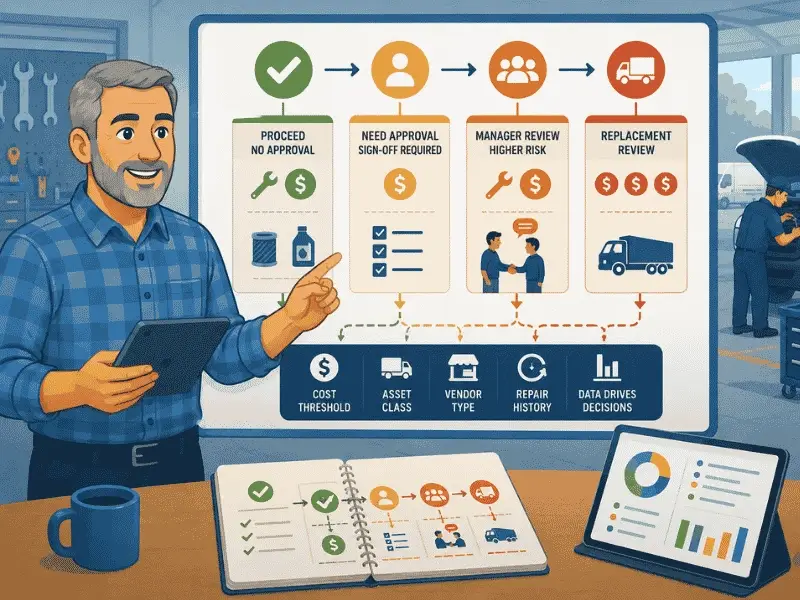
What I have seen across hundreds of fleet conversations is that the teams with the best repair cost control are rarely the ones with the most approval layers. They are the ones who made three specific decisions clearly: which repairs can proceed without approval, which ones need a sign-off, and which ones should trigger a broader conversation about whether the asset is worth repairing at all. Everything else follows from those three decisions.
Why Repair Approval Workflows Break in Both Directions
Most fleets I talk to have fallen into one of two failure modes.
Failure mode 1: No approval structure
Repairs happen when a technician decides they need to happen. Invoices arrive after the work is done. The fleet manager sees the cost in the monthly report and cannot trace it back to who authorized what, whether there were alternatives, or whether the vendor charge was accurate. The fleet is not out of control. It just has no record of how it arrived at its current cost.
At twenty assets, this is manageable. At eighty assets with multiple technicians and several external vendors, it is where significant money disappears quietly.
Failure mode 2: Over-engineered approval
Every repair above a low threshold needs a manager sign-off. Every vendor job needs a purchase order. Every part needs a quote. The controls are thorough on paper. In practice, technicians are waiting two days for approval on a brake pad replacement while the vehicle sits out of service. The approval process is costing more in downtime than it is saving in prevented overspend.
The objection I hear most from fleet managers switching from over-controlled systems is not that they want to remove accountability. It is that the approval chain was built for accounting, not for operations. It treated every repair as if the risk were the same, regardless of what the job was, how much it cost, or what the asset's history looked like.
Download Our Free Fleet Maintenance Resources Now!
Prevent costly breakdowns and maximize uptime with our free checklist.
Download
The Three Decisions Every Approval Workflow Has to Make
Before you build the workflow, you need to make three decisions explicitly. Most approval problems come from skipping one of these.
Decision 1: What is the cost threshold for immediate authorization?
Every fleet needs a threshold below which a repair can proceed without sign-off. The right number varies by fleet size, asset value, and operating context, but the principle is universal: low-cost, routine repairs should not require manager involvement.
A common starting point for mid-market fleets is somewhere between two hundred and five hundred dollars for in-house technician work, with a separate and lower threshold for external vendor jobs. The logic is straightforward: vendor jobs carry more cost uncertainty than in-house work because the final invoice can differ from the estimate.
What matters is that the threshold is written down, communicated to technicians, and applied consistently. A threshold that exists only in the fleet manager's head is not a threshold. It is a judgment call that varies by who is asking.
Decision 2: What triggers the next approval level?
Above the immediate authorization threshold, you need to define who approves what, and how quickly they are expected to respond. This is where most approval workflows become vague.
A useful structure separates approvals by three factors:
- Cost band: repair estimates below a certain level go to the site manager; above that to the regional manager or fleet director.
- Vendor type: in-house work may go through one path; external vendor work through another with a quote requirement attached.
- Asset class: a high-value piece of construction equipment may have a lower approval threshold than a mid-range delivery van, because the repair cost relative to asset value is different.
The key rule is that the person approving should have enough context to make a real decision, not just rubber-stamp a request. That means the approval request needs to include: the asset, the repair description, the estimated cost, the technician or vendor assigned, and the asset's recent repair history. An approval email with only the cost and a job description is not enough.
Decision 3: When does a repair trigger a replacement review?
This is the decision most approval workflows never make, and it is where the biggest cost control opportunity lives.
A repair that costs two thousand dollars on a fifteen-thousand-dollar asset with a clean history is probably worth approving. The same repair on an asset that has had six thousand dollars in repairs over the past twelve months is a different conversation. That second scenario should not go through the standard approval path. It should trigger a review of whether repair is even the right decision. The framework for that review, what to compare and how to build the case, is covered in more detail in this guide to how to calculate total cost of ownership for a fleet.
The trigger can be a cost-to-value ratio, a cumulative repair cost threshold within a rolling period, or a repeat failure count on a specific system. What it should not be is a manual judgment made at the point of the repair request, because at that moment nobody has the full picture in front of them.
How to Structure a Threshold-Based Approval System
Here is how a practical approval structure looks across different repair types and cost bands. This is a framework, not a prescription. Your specific thresholds will depend on your fleet size, asset values, and operating context.
The expedited path for safety-critical repairs is worth highlighting separately. The most common mistake in approval design is applying the same timeline to a safety defect as to a non-urgent repair. If a driver reports a brake issue, the approval process needs to move within hours, not days. That means the approval path for safety items should be shorter and the default should be to take the vehicle out of service immediately, not to wait for sign-off before grounding it.
The Workflow: From Repair Request to Closed Invoice
An approval decision is only as good as the information behind it. Here is the workflow that makes approvals informed rather than instinctive:
Step 6, matching the vendor invoice to the approved estimate, is where many fleets lose cost control even when they have a solid approval process. An approval granted on a fourteen-hundred-dollar estimate that comes back as a nineteen-hundred-dollar invoice is not just an overspend. It is a sign that the vendor relationship needs review. Understanding how fleet vendor and invoice management should work is worth reading alongside this approval framework.
What Approval Decisions Should Be Based On
The most common reason approval workflows do not control cost is that the approver does not have enough context when the request arrives. They see the repair description and the cost estimate. They do not see the asset's repair history, how many times the same system has been worked on, or whether the vendor has a pattern of coming in over estimate.
Here is what should be visible to every approver before they sign off:
- Asset repair history: total spend in the last twelve months, broken down by repair type and vendor.
- Repeat repairs on the same system: how many times this specific type of repair has been done on this asset.
- Current open work orders on the asset: is there already other work in progress or pending that changes the priority of this repair?
- Asset age, mileage or hours, and current replacement value: the context for whether the repair cost is proportionate.
- Vendor history: if the repair is going to an external shop, what is their track record on estimate accuracy and repeat jobs?
Without that context, an approval is just a rubber stamp. With it, an approver can make a real decision: proceed as submitted, request a second quote, combine with other open work on the same asset, or escalate to a replacement review. For the reporting view that supports these decisions, the fleet reporting metrics guide covers what data to surface and how to structure it for different audiences.
Where Approval Workflows Break Down: Common Mistakes
How Approval Thresholds Differ by Fleet Type
The right threshold structure depends on your operating context. A trucking fleet has different risk priorities from a construction equipment fleet or a municipal operation. The principle is the same: match the approval level to the actual risk, not to a number that feels administratively comfortable. Teams managing fleet maintenance work orders across multiple asset types often find that a single threshold fails both high-value assets and low-value ones.
How Simply Fleet Supports a Repair Approval Workflow
In my experience talking to fleet managers every week, the ones who get cost control right are not the ones with the most complex approval systems. They are the ones whose approval decisions are connected to the actual repair record, not to a separate email chain or a shared spreadsheet that nobody updates consistently.
Here is how Simply Fleet's workflow connects to the approval structure described in this article:
Work orders with cost capture: Every repair goes through a work order with technician assignment, estimated and actual cost, parts consumed, labor time, and repair notes. Approvers see the full picture before sign-off. Costs are captured at the job level, not reconstructed from invoices after the fact. See the digital work order software.
Issue management with priority levels: Repair needs enter the system through reported issues, with priority set at the point of reporting. High-priority and safety-flagged issues are visible separately from routine work. That separation feeds the expedited approval path for safety items. See the issue management feature.
Service history per asset: Every closed work order feeds the asset's service history automatically. Before approving a repair, a manager can pull the full repair record for that asset, including previous jobs on the same system, total spend in any period, and vendor history. That context is what turns an approval from a rubber stamp into an actual decision.
Expense logging and cost reporting: Vendor invoices, repair costs, and parts expenses are logged against the asset. Reports can be filtered by asset, asset group, location, vendor, expense category, or date range. Cost per asset and total cost of ownership are visible without building a separate spreadsheet. The fleet reporting and data analysis features give managers the view they need for both real-time approval decisions and post-repair trend analysis.
Parts inventory linked to work orders: Parts used in a repair are deducted from inventory when the work order closes. The actual parts cost is captured at the job level, not estimated after the fact. See parts inventory management.
Role-based access: Managers see the assets and work orders within their scope. Technicians see their assigned jobs. Admins see everything. The approval structure maps to the access structure, so the right people are reviewing the right requests without needing workarounds.
Conclusion: Cost Control and Shop Speed Are Not Opposites
What customers come back and tell us three months after getting their approval workflow right is not that they are spending less on every repair. It is that they finally know what they are spending and why. The cost control comes from visibility, not from more sign-offs.
The sl,, hops that move fastest are not the ones with no approval structure. They are the ones where routine work flows without friction, urgent safety items get immediate attention, and high-cost or repeat repairs get the scrutiny they deserve before anyone picks up a wrench.
That structure does not require a complicated system. It requires three decisions made clearly, a workflow that captures the right data at the right point, and a reporting view that connects approval decisions to actual cost outcomes. The rest is process.
Build the threshold structure first. Make sure approvers have context, not just cost. And create a separate path for safety items, because the only approval that should move fast is the one that keeps a vehicle off the road until the brakes are fixed.
If you want to see how the work order and cost tracking workflow looks in practice, book a demo or explore the fleet maintenance software overview.