

Construction Equipment Downtime Cost: How to Calculate It (and Cut It)
Key Takeaways
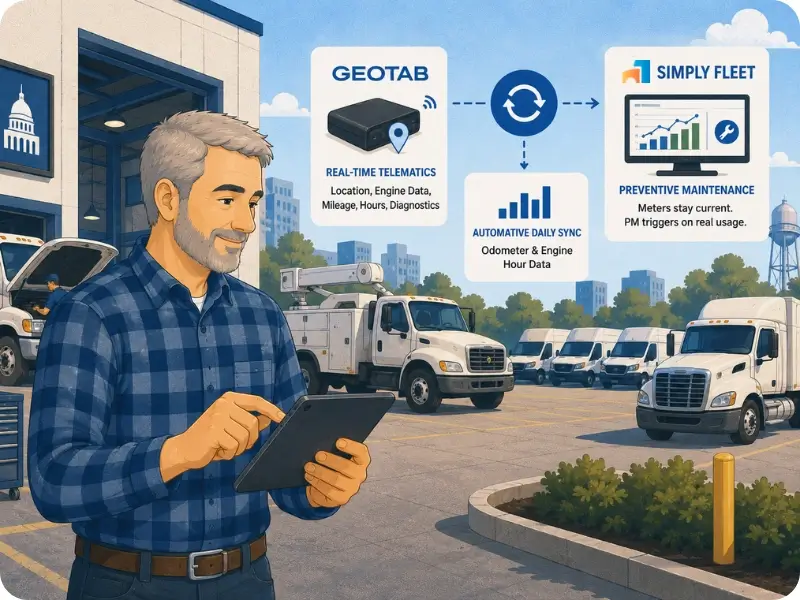
- Geotab provides real-time telematics. Simply Fleet uses that data to update each vehicle's maintenance meter automatically, once a day.
- The integration syncs the vehicle's primary meter: mileage for vehicles tracked by distance, engine hours for vehicles tracked by hours.
- That makes it genuinely useful for mixed and heavy-equipment fleets, where some assets run on miles and others on hours.
- Removing manual meter entry is what keeps preventive maintenance accurate at scale, where hand-entry cannot keep pace across hundreds of assets.
- The integration is available on Simply Fleet's Advanced plan, and Samsara and Verizon Connect are supported alongside Geotab.
Most large fleets that run Geotab are using maybe a third of what the data could do for them. The telematics side is excellent: real-time location, driving data, engine diagnostics, all of it flowing in continuously. But when I look at how that data connects to maintenance, the picture is usually broken. The meter readings Geotab captures are sitting in one system, and the preventive maintenance schedule that depends on those readings is being fed by hand in another.
That gap is the whole subject of this article. A large fleet running Geotab already has accurate, continuously updated usage data for every vehicle. The question is whether that data reaches the maintenance system, or whether someone is still typing odometer and hour readings into a separate tool. On most fleets I have looked at, it is the second one. And that manual step is where preventive maintenance accuracy quietly falls apart at scale.
The Geotab and Simply Fleet integration closes that gap. Geotab does what it does best, real-time telematics. Simply Fleet uses that data to keep each vehicle's maintenance meter current automatically, so preventive maintenance triggers on what the asset actually did. Let me be precise about how that works, where it matters most, and why it matters more as the fleet gets larger.
The Part of Telematics Most Large Fleets Leave on the Table
Here is what most telematics coverage gets wrong. It treats telematics as a tracking and safety tool, location, routing, driver behavior, and stops there. Those are real benefits. But the most underused output of a telematics system on a large fleet is the meter data, and specifically what that meter data could do for maintenance if it were connected.
Every Geotab-tracked vehicle is continuously generating an accurate read of how far it has driven or how many hours it has run. That is exactly the input a preventive maintenance schedule needs. Mileage-based and hour-based PM both depend on one thing: knowing the vehicle's true current meter reading. Geotab has that reading. The maintenance system needs it. And on a fleet where those two are not connected, a person is bridging the gap by hand.
At small scale, hand-entry almost works. At large scale, it does not, and the failure is invisible until it shows up as a missed service or an early breakdown. I have written before about why fleets break down despite running a real PM program, and stale meter readings are one of the most common hidden causes. The schedule is fine. The number feeding it is behind.
What the Geotab Integration Actually Does
Precision matters here, so let me state the mechanism plainly rather than wrapping it in marketing. When Simply Fleet is connected to Geotab and the daily auto-update option is enabled in the integration settings, Simply Fleet uses Geotab's data to update each vehicle's meter reading automatically, once a day, at midnight. No one enters the reading. The meter in Simply Fleet reflects what the vehicle actually did.
The detail that makes this useful for large and mixed fleets is which meter it syncs. The integration updates the vehicle's primary meter. If a vehicle is tracked by mileage, it pulls the mileage. If a vehicle is tracked by engine hours, it pulls the hours. That matters because a large fleet is rarely all one type. You have on-road vehicles measured in miles and heavy or stationary equipment measured in hours, and the integration handles both according to how each asset is set up.
I want to be straight about one thing, because overselling an integration does not help anyone evaluating it. The real-time part of this combination is Geotab. What flows into Simply Fleet is a reliable daily meter update, not a live, second-by-second feed, and it does not need to be. Preventive maintenance does not care whether a vehicle crossed its interval at 10am or by end of day. A dependable daily update is the correct resolution for maintenance timing. Geotab handles the real-time tracking; Simply Fleet handles the maintenance, fed by accurate daily data.
Why This Matters More as the Fleet Gets Larger
The argument for this integration is not really about any single vehicle. For one vehicle, a diligent person can keep the meter current by hand. The argument is about scale, because the manual approach degrades in a specific, predictable way as the asset count climbs.
The pattern is consistent: the larger and more mixed the fleet, the less manual meter entry can keep up, and the more the maintenance program depends on data that is quietly out of date. This is the same scaling problem that shows up across fleet operations, where a process that works on attention at small scale fails when attention runs out. Automatic meter sync removes the dependency on attention entirely.
Download Our Free Fleet Management Resources Now!
Prevent costly breakdowns and maximize uptime with our free checklist.
Download
The Reporting Payoff Nobody Mentions
Most of the conversation about telematics-to-maintenance integration stops at PM timing. That is the main benefit, but it is not the only one, and the second one is underrated: accurate meter data fixes your reporting too.
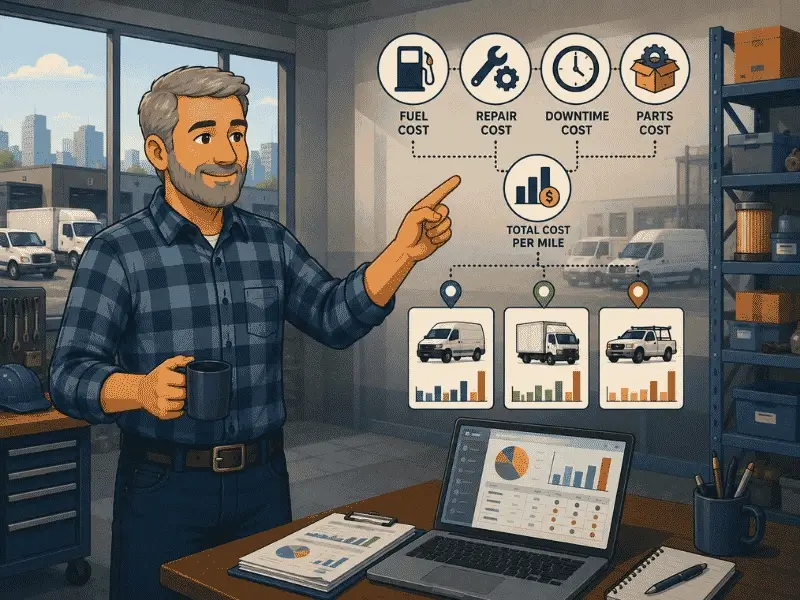
Think about every number that depends on a meter reading. Cost per mile. Cost per hour. Utilization. Asset comparison. All of these are only as accurate as the meter data behind them. If your odometer and hour readings are entered by hand and routinely stale, every report built on them inherits that staleness, which is exactly why so many fleet managers quietly distrust their own cost-per-mile numbers.
Fix the meter input, and several reports get more trustworthy at once. This connects directly to the practice of tracking vehicle mileage against repair costs, which only works if the mileage is accurate. For a large fleet making real budget and replacement decisions on these numbers, the difference between hand-entered and automatically synced meter data is the difference between a report you can defend and one you cannot.
Who Gets the Most From This Combination
This integration earns its value on fleets where two conditions hold: you are already running Geotab, and your asset count or usage intensity is high enough that manual meter entry cannot keep pace. If both are true, the integration removes a real and growing source of error from your maintenance program.
- Large fleets on Geotab still entering meter readings into their maintenance system by hand. This is duplicated effort and a built-in source of staleness.
- Mixed fleets running both mileage-based vehicles and hour-based equipment, where the primary-meter sync handles each asset correctly.
- Heavy equipment and construction fleets where engine-hour-based PM is the standard and accurate hour readings are critical.
- Fleets making budget, utilization, or replacement decisions on meter-dependent reports that need to be accurate enough to defend.
If you run a small, light-use fleet and manual entry genuinely keeps up, you may not need this yet, and I would rather say that than pretend every fleet needs every integration. But for a large fleet, manual meter entry is not a sustainable system. It is a backlog waiting to happen.
How It Fits the Maintenance Workflow
The meter sync is one input into a larger cycle, and it is worth seeing where it sits. Accurate meter data feeds the PM schedule. The schedule triggers a reminder. The reminder becomes a service or work order. Completing the work resets the next due date. The whole cycle now runs on real usage data instead of manual entry.
Here is how the pieces connect inside Simply Fleet:
Telematics integrations connect Simply Fleet to Geotab, Samsara, or Verizon Connect for automatic daily meter updates. This capability is part of the Advanced plan. See the fleet integrations page.
Preventive maintenance reminders run by mileage, engine hours, or date, and reset automatically after each service. With Geotab feeding the primary meter, both mileage-based and hour-based reminders run on current data. See preventive maintenance software.
Reporting and data analysis depend on accurate meter data for cost per mile, cost per hour, and utilization. The integration makes those reports more reliable across the fleet. See reporting and data analysis.
Conclusion: The Data Is Already Accurate. Use It Where It Counts.
The finding that stood out when I looked at how large fleets run Geotab alongside maintenance is that the accurate data already exists. These fleets are not short on meter data. Geotab is capturing it continuously and correctly. The data is just not reaching the system that needs it most, the preventive maintenance schedule, because a manual step sits in between.
That is the entire case for this integration, and it is a data case, not a marketing one. Remove the manual meter entry, let Geotab's accurate readings flow into Simply Fleet automatically, and preventive maintenance finally runs on what your vehicles actually did rather than on the last number someone typed in. At a large fleet's scale, that is the difference between a PM program that holds and one that drifts.
If you are running Geotab and still entering meter readings into your maintenance system by hand, you are leaving the most useful part of your telematics data unused, and carrying a source of error that grows with every vehicle you add. Connect the two, and put the accurate data where it actually changes outcomes.
To set up the integration or see it in action, book a demo or explore Simply Fleet's fleet integrations.