.webp)



Keeping Up with the Industry: Fleet Forward Conference 2026
Key Takeaways
- Fuel card odometer readings provide real-time mileage data at every transaction, improving accuracy across fleet operations
- Level III fuel card data links fuel usage, driver, and vehicle details into a single, actionable dataset
- Validated odometer data helps identify inconsistencies in fuel usage and reduces the risk of fraud or errors
- Accurate mileage tracking enables reliable cost per mile calculations and better financial visibility
- Integrating fuel data with maintenance systems allows preventive maintenance to trigger based on actual vehicle usage
- For mid-size and large fleets, connecting fuel data to workflows removes manual tracking and improves decision-making
Every time one of your drivers swipes a WEX card at the pump, something happens that most fleet managers never think about. Before the transaction goes through, the pump asks for two things: a PIN, and a current odometer reading.
That prompt is easy to overlook. Drivers enter a number, the pump dispenses fuel, and life moves on. But that odometer reading? It is not just for record-keeping. In the right setup, it becomes one of the most useful data points in your entire fleet operation.
Here is what it actually does, and why it is worth paying attention to.
What Happens When a Driver Swipes a Fleet Card at the Pump
Most people assume a fuel card works like a credit card. Swipe, approve, done. But fleet cards like WEX collect significantly more data than that, and it happens automatically at every transaction.
When a driver uses a WEX card, the pump captures what is called Level III transaction data. This is the most detailed tier of payment data available, and it includes:
- Driver ID or PIN
- Vehicle unit number
- Current odometer reading (entered by the driver)
- Number of gallons dispensed
- Cost per gallon
- Fuel grade (regular, premium, diesel)
- Date, time, and location of the transaction
A standard credit card captures your total and the merchant name. Level III data captures the who, what, where, when, and how much of every single fill-up, tied directly to a specific vehicle.
That is a meaningful difference. And the odometer reading sits at the center of it.
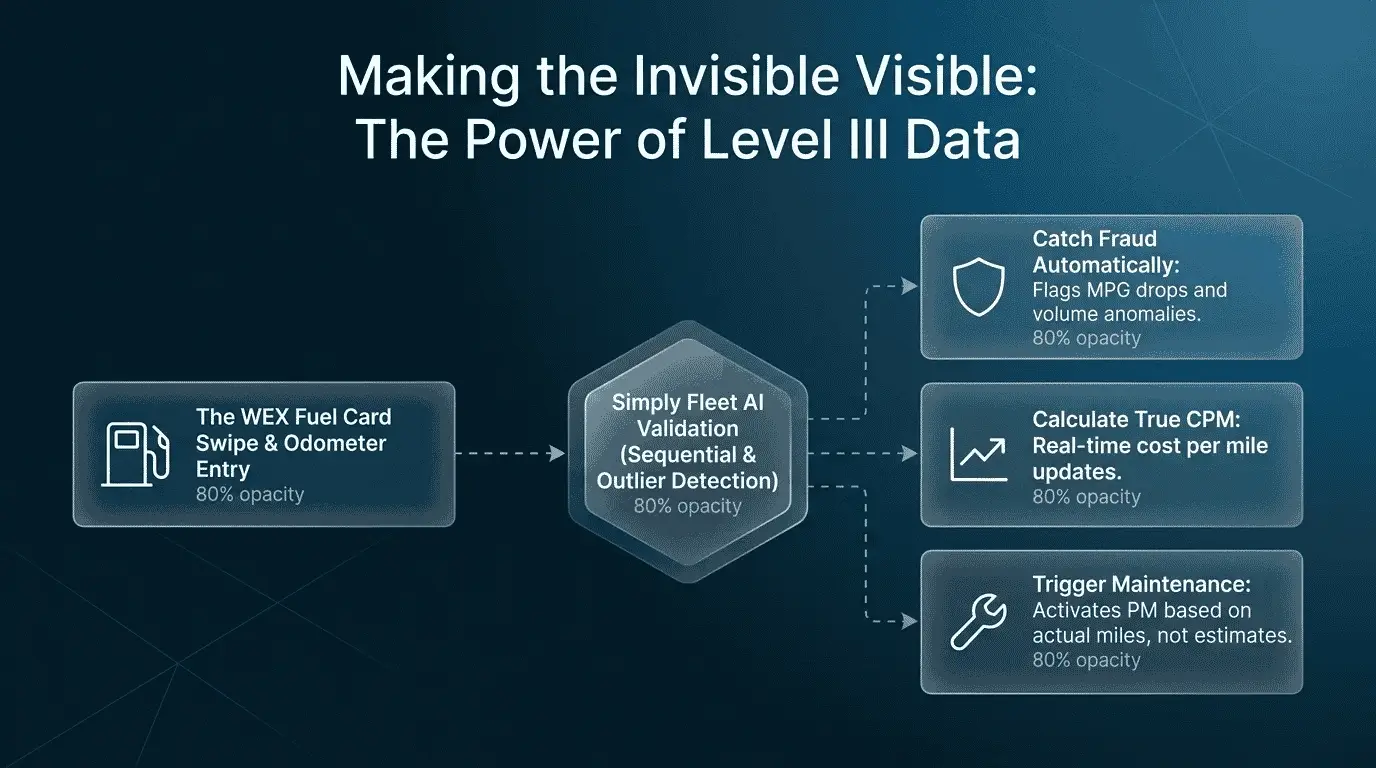
Most fleets already collect this data through fuel cards, but it’s rarely connected to maintenance or cost tracking. That gap is where most inefficiencies start.
Why the Odometer Reading Is the Most Valuable Data Point
Think about what odometer data actually tells you. It gives you the vehicle's true mileage at the moment of fueling. Not an estimate. Not what a driver reported on a form. The actual number, captured at the pump.
That single data point unlocks three things that matter to fleet managers.
1. It catches fraud automatically
Here is a scheme that is common and hard to spot without data: a driver fills up a company vehicle and keeps pumping into a personal container or a friend's car on the same transaction. The receipt looks normal. The gallon count does not.
When you have odometer data paired with fuel volume, you can calculate the expected miles per gallon for that vehicle over time. If MPG drops sharply on a specific transaction, it means either more fuel was dispensed than the vehicle could hold, or the vehicle burned more than expected since the last fill-up. Either way, something does not add up.
Simply Fleet runs an odometer sanity check on every transaction imported from WEX. If the odometer reading entered at the pump is lower than the previous recorded reading for that vehicle, the record is flagged and rejected. No manual review required. The system catches the inconsistency automatically, whether it was an honest driver error or an intentional entry meant to obscure usage.
This is not a detective operation. It is a passive filter that runs in the background every time a transaction comes in.
💡Odometer readings collected through fuel cards are a reliable source of mileage data because they are captured at the point of fuel transaction and tied to a specific vehicle. When validated and integrated into fleet management systems, this data improves maintenance scheduling, cost tracking, and fraud detection.
2. It gives you accurate cost per mile
Cost per mile is one of the most useful metrics in fleet management. It tells you the true operating cost of running a vehicle, accounting for fuel spend relative to actual mileage. But it is only reliable if your mileage data is accurate.
Fleets that rely on driver-reported odometer readings or manual spreadsheet entries know the problem: drivers enter round numbers, forget to log fill-ups, or record the wrong vehicle. The data looks fine on the surface, but cost per mile calculations end up based on estimates rather than facts.
When WEX Level III data feeds automatically into Simply Fleet, the odometer reading at every fill-up updates the vehicle's current mileage in real time. No driver entry. No manual reconciliation. The cost per mile calculation uses actual pump data, which makes it reliable enough to act on.
Most fleets track fuel spend, but very few trust their cost per mile numbers because the mileage data isn’t consistent.
3. It triggers preventive maintenance automatically
This is the one most fleets are not using, and it is the biggest missed opportunity.
Most maintenance schedules are built on one of two things: calendar dates or estimated mileage. Both are approximations. A vehicle that runs 20,000 miles in four months should not be on the same oil change schedule as one that runs 8,000 miles in that same period. But if your system does not know actual mileage, it treats them the same.
When fuel card odometer data flows into Simply Fleet, the system has a continuously updated picture of each vehicle's true mileage. When a vehicle crosses a service threshold, such as 5,000 miles since last oil change, Simply Fleet can trigger a maintenance reminder or automatically open a work order, without anyone having to check in on it manually.
This is the connection most fleet management content never explains. The odometer reading at the pump is not just a fuel metric. It is the input that makes your preventive maintenance software accurate.
💡Fuel card odometer data can be used to trigger preventive maintenance schedules based on actual vehicle usage, eliminating the need for manual tracking or estimated service intervals.
Download Our Free Fleet Maintenance Resources Now!
Prevent costly breakdowns and maximize uptime with our free checklist.
Download
The Common Problem: Drivers Enter the Wrong Number

Here is the honest version of how this works in practice. Fuel cards can prompt for an odometer reading, but they cannot verify it. A driver who enters 45,000 instead of 54,000 will still get fuel. The transaction will process. And your records will be wrong.
This is not always intentional. Drivers who run multiple vehicles, or who are tired at the end of a shift, make honest mistakes. But over time, those errors compound. Your cost per mile figures drift. Your maintenance triggers fire at the wrong time. And fraud schemes that depend on low odometer entries stay invisible.
Simply Fleet addresses this with two mechanisms:
Sequential validation. If a new odometer entry is lower than the previous entry for that vehicle, the system flags it. A vehicle cannot travel backward. This catch alone eliminates the majority of entry errors and the most common manual manipulation tactic.
Sequential odometer validation ensures data accuracy by rejecting entries that are lower than previous readings, helping fleets identify errors or inconsistencies in reported mileage.
Outlier detection. If an odometer entry implies a vehicle traveled an unrealistically high number of miles since its last fill-up, that transaction is also flagged for review. A truck that somehow gained 4,000 miles between two same-day fill-ups needs a second look.
Neither of these requires a fleet manager to audit every transaction. The flags surface the ones worth reviewing, and everything else passes through cleanly.
How This Works With WEX Specifically
WEX captures Level III data on the vast majority of transactions across its network, which covers about 95% of US fuel stations. That is the data arriving automatically in Simply Fleet for every WEX-integrated fleet.
When a WEX transaction lands in Simply Fleet, it arrives with the vehicle assignment, driver ID, gallons, cost, and odometer reading already attached. The system runs its validation checks, updates the vehicle's mileage, recalculates cost per mile, and checks whether any maintenance thresholds have been crossed. All of this happens without a person doing anything.
For fleet managers who have been manually reconciling fuel receipts at the end of every month, this shift is significant. The data that used to require hours of work each month arrives structured, validated, and ready to use.
For drivers, nothing changes. They enter their odometer reading at the pump the same way they always have. The integration happens in the background.
Practical Steps: Setting Up Odometer Tracking Correctly
If you use WEX cards and want to make odometer data actually useful, a few setup decisions matter.
Assign cards to vehicles, not drivers. When a card stays with a specific vehicle, every odometer entry at the pump is tied to that unit automatically. If cards are shared across drivers without vehicle assignment, the data loses its reliability.
Set a baseline for each vehicle. The first time a vehicle is added to Simply Fleet, record its current odometer. That gives the system a starting point for all subsequent validation and cost calculations.
Connect your WEX account. Simply Fleet pulls WEX transaction data automatically through the integration. There are no CSV exports, no manual imports, and no scheduled batch updates. The data arrives when the transaction processes.
Review flagged transactions weekly. The system will surface odometer anomalies automatically. A quick weekly review of flagged entries takes about ten minutes and catches problems before they affect your maintenance schedules or cost reports.
What Fleet Managers Should Know: A Quick FAQ
Does every WEX transaction include an odometer reading? Most do. WEX prompts drivers for an odometer entry at the pump on the majority of its network. For the small percentage of locations that do not capture it, the transaction still imports into Simply Fleet but without mileage data for that entry.
What if a driver enters the wrong odometer? Simply Fleet flags sequential errors automatically. If the entered reading is lower than the prior entry, the transaction is rejected from the mileage calculation until corrected. A fleet manager can override and correct the entry manually if the error was honest.
Can I use this to schedule maintenance without telematics hardware? Yes. WEX odometer data in Simply Fleet provides a continuous mileage feed that can trigger preventive maintenance reminders based on actual miles driven. No telematics device is required. If you do have telematics connected, the two data sources work together to cross-validate each other.
Does this work for diesel fleets and mixed fuel types? Yes. WEX Level III data captures fuel grade on every transaction, and Simply Fleet tracks it by vehicle. Mixed fleets with gasoline, diesel, and even bulk fuel purchases can all be tracked in the same dashboard.
How long does it take to set up the WEX integration? The WEX connection in Simply Fleet is configured in the integrations settings. Most fleets are pulling live transaction data within a day of setup. No developer work required.
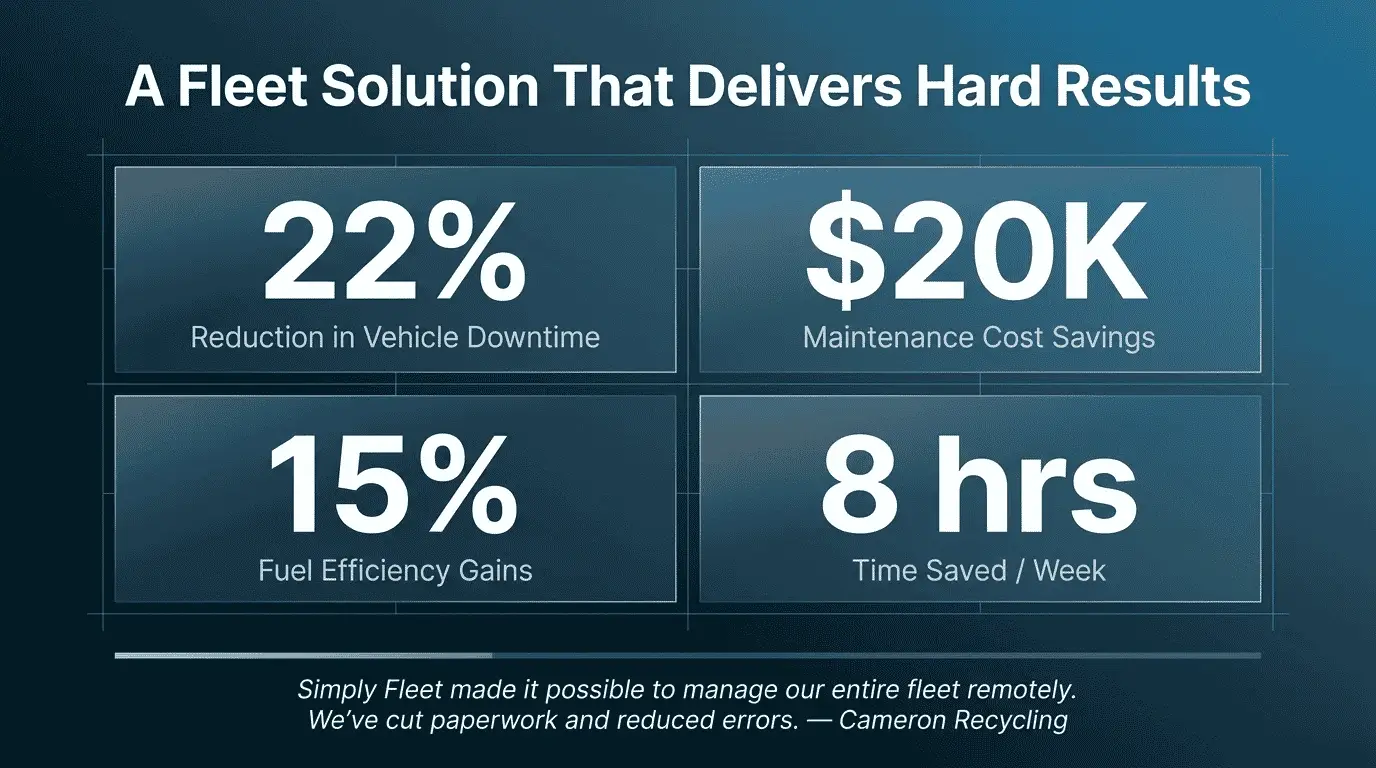
The Bottom Line
A fuel card odometer reading sounds like a minor detail. It is not. It is the data point that connects fuel spend to vehicle mileage, makes your maintenance schedule accurate, and gives the fraud detection system something to check against.
Most fleets have access to this data already through WEX. The gap is usually on the software side: pulling that data automatically, validating it on arrival, and routing it into the right workflows.
That is what the WEX integration in Simply Fleet is built to do. The odometer reading your driver enters at the pump does the heavy lifting. The system handles the rest.
If you want to see how your fleet's fuel data compares against your current maintenance schedule, book a demo and we can walk through it with your actual numbers.