Maintenance-first fleet management
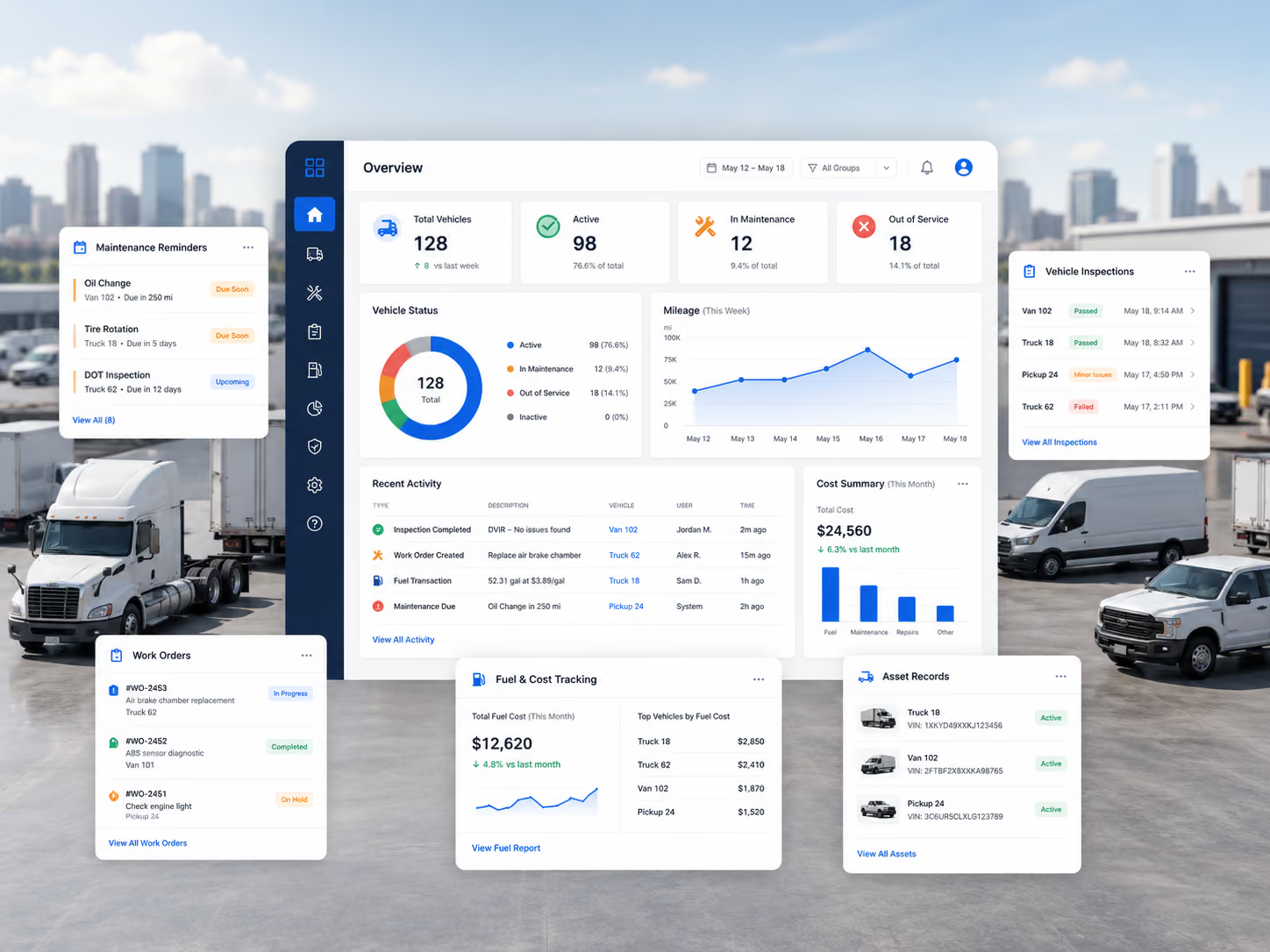
Choose this when maintenance, shop execution and asset records are the operating core. Compare Simply Fleet and Fleetio; consider RTA for dedicated-shop FMIS.



Simply Fleet is our #1 Best Overall pick. Built for U.S. fleets that need serious maintenance and operational depth without enterprise software complexity.
It connects maintenance and shop operations, mixed assets, fleet costs and multi-location workflows in one platform built to scale.
Best for
Mid-sized and large maintenance-led fleets
Specialist alternatives
Samsara for telematics · Motive for trucking compliance · Fleetio for ecosystem breadth
| Award | Product | Why it fits |
|---|---|---|
| Best Overall Fleet Management Software | Simply Fleet | Complete maintenance + fleet operations across mixed and multi-location fleets. |
| Best for Integrated Fleet Maintenance & Operations | Simply Fleet | PM → inspection → issue → work order → technicians → parts/labor → service history. |
| Best for Maintenance Ecosystem & Integrations | Fleetio | Deep maintenance lifecycle plus broad telematics, fuel and integration ecosystem. |
| Best for Enterprise Telematics | Samsara | Real-time GPS, cameras, safety, routing and connected operations. |
| Best for Driver Safety & Trucking Compliance | Motive | ELD, HOS, IFTA, safety coaching and trucking telematics. |
| Best for Open Telematics Infrastructure | Geotab | Deep vehicle data and an extensible Marketplace ecosystem. |
| Best for Customizable GPS-Led Fleet Operations | Verizon Connect | Near real-time tracking, route history, driver behavior, reports and asset visibility. |
| Best for Dedicated Maintenance Shops | RTA Fleet360 | Maintenance-first FMIS depth around technicians, parts, purchasing and shop control. |
| Best for Complex Public-Sector Fleets | AssetWorks FleetFocus | Enterprise lifecycle, inventory, purchasing, fuel and public-sector reporting. |
Compare platforms across maintenance depth, shop workflows, fleet size, telematics, compliance, cost and implementation.
| Software | Best for | Fleet size | Maintenance depth | Shop workflows | GPS / telematics | U.S. compliance | Pricing | Implementation |
|---|---|---|---|---|---|---|---|---|
| Simply Fleet | Integrated maintenance + fleet operations | Growing–Large | Deep: PM, inspections, defects, WOs, history | Technicians, labor, parts batches, status, cost | Via Samsara, Geotab, Motive, Verizon Connect | Inspections/docs; not ELD/HOS-first | Published $2 / $4 per vehicle/mo | Low–medium |
| Fleetio | Maintenance ecosystem + integrations | Mid–Large | Deep maintenance + lifecycle | Strong; deeper controls by plan | Via telematics/OEM ecosystem | Inspection/records; partner-led trucking | From $4/vehicle/mo annually | Low–medium |
| Samsara | Enterprise telematics + safety | Mid–Enterprise | Strong, telematics-led | Available; not sole center of gravity | Native GPS, routing, cameras | ELD/HOS + safety | Quote / pricing flow | Medium–high |
| Motive | Trucking compliance + safety | Growing–Enterprise trucking | Reminders, inspections, faults | Not maintenance-shop centered | Native GPS + cameras | ELD, HOS, IFTA, CSA | Contact vendor | Medium |
| Geotab | Open telematics infrastructure | Mid–Enterprise | PM + work orders / ecosystem | Integration-led | Native GO telematics | ELD/IFTA options | Get pricing | Medium–high |
| Verizon Connect | Customizable GPS-led operations | Small–Enterprise | Maintenance alerts / vehicle health | Not maintenance-shop centered | Native near real-time GPS + route history | Safety / driver visibility; verify trucking modules | Plans / sales-led | Medium |
| RTA Fleet360 | Dedicated maintenance shops | Mid–Large | Very strong FMIS depth | Core strength | Integration-led | Fleet records; not trucking-first | Contact vendor | Medium–high |
| AssetWorks | Complex public-sector fleets | Large–Enterprise | Very strong enterprise FMIS | Deep multi-shop / lifecycle | Integrated options | Public-sector governance focus | Contact vendor | High |
Start with the operating problem: maintenance and shop execution, connected telematics, or regulated trucking compliance.
Choose this when maintenance, shop execution and asset records are the operating core. Compare Simply Fleet and Fleetio; consider RTA for dedicated-shop FMIS.
Choose this when live GPS, routing, cameras, driver behavior and connected vehicle data drive the decision. Compare Samsara, Geotab and Verizon Connect.
Choose this when ELD, HOS, IFTA and driver safety dominate. Motive is the specialist fit.
Simply Fleet ranks #1 because it connects the full maintenance and shop workflow: PM → inspection/defect → work order → technician → labor/parts → service history and cost. The same platform supports mixed assets, fuel, expenses, reporting and telematics-fed maintenance data.
For mid-sized and large fleets, groups, role-based access and centralized reporting support structured work across locations, departments, shop teams and field users.
Complex fleet operations. Easier software. Simple to use does not mean simple in capability. Fleetio is the closest maintenance-first peer; choose specialist platforms when native telematics, regulated trucking or highly specialized FMIS requirements dominate.
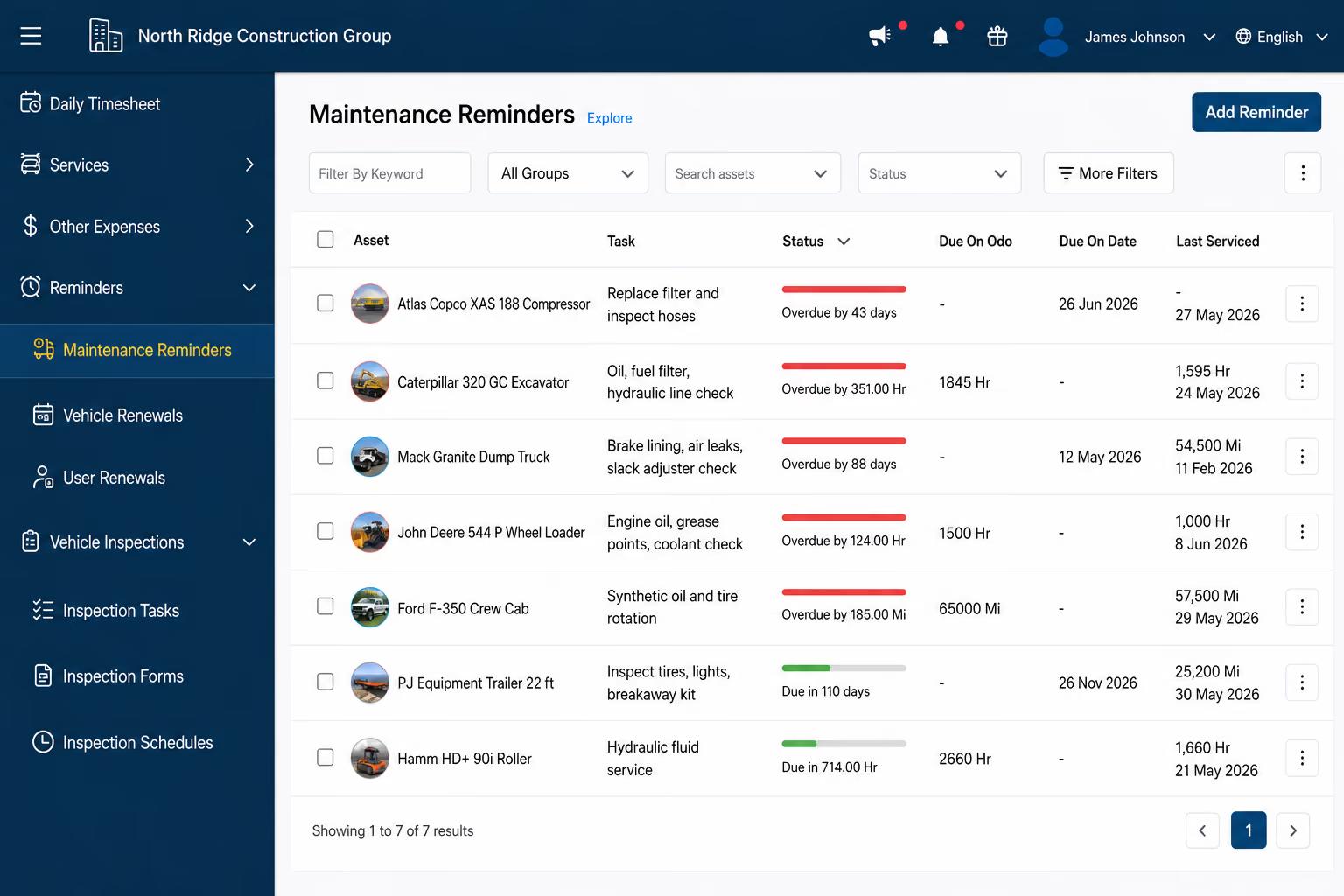
Schedule PM by mileage, engine hours or time.
Capture inspections, photos, signatures and defects from mobile.
Assign technicians and record time, labor, parts, notes, status and cost.
Keep service, fuel and repair history tied to each asset.
Simply Fleet publishes this comparison and is included in the ranking. That relationship is disclosed throughout the methodology.
Maintenance and shop depth, mixed-fleet operations, fleet-size fit, mobile execution, integrations, reporting, implementation, pricing transparency and specialist telematics/compliance fit.
Official product, help, integration and pricing documentation for all eight platforms in this comparison.
This comparison is documentation-led rather than a hands-on test of every competitor. Implementation labels are editorial assessments, not vendor-promised timelines.
August 15, 2026. Features, pricing and integrations can change; verify them directly before purchase.
Best for: Mid-sized and large mixed fleets needing integrated maintenance and fleet operations, plus growing fleets that want the same workflow depth as they scale.
Pricing: Essential $2/vehicle/month; Advanced $4; free up to five vehicles.
Hardware: Not required for core workflows.
Implementation: Low–medium.
Why we picked it: Simply Fleet connects mileage/engine-hour/time-based PM, inspections, defects, work orders, lead/supporting technicians, labor, parts batches, repair cost and service history. It also supports mixed assets, groups/locations, role-based access, fuel, expenses, reporting and telematics feeds, putting it in the same maintenance-led consideration set as Fleetio. See the platform.
Main limitation: It is not a native live-GPS, routing, dash-cam, HOS or IFTA platform.
Choose something else when: native telematics, regulated trucking or highly specialized FMIS requirements dominate.
Key strength
Connected maintenance + operations
Best for: Mid-sized and large fleets wanting deep maintenance and lifecycle management with a broad integration and reporting ecosystem.
Pricing: Essential from $4/vehicle/month annually ($5 monthly); Professional $7; Premium $10.
Hardware: Not required.
Implementation: Low–medium.
Why we picked it: Fleetio is Simply Fleet's closest maintenance-first benchmark, with strong PM, inspections, work orders, inventory, lifecycle reporting and a broad GPS/telematics integration directory.
Main limitation: Some deeper integrations, analytics and workflow controls sit in higher tiers, and GPS depends on third-party/OEM integrations.
Choose Fleetio when: ecosystem breadth and advanced reporting outweigh Simply Fleet's connected shop/field execution and pricing transparency. See Simply Fleet vs Fleetio.
Key strength
Maintenance + ecosystem depth
Best for: Mid-to-large and enterprise fleets prioritizing connected telematics, safety and real-time operations.
Pricing: Quote/pricing flow.
Hardware: Yes for connected telematics and cameras.
Implementation: Medium–high.
Samsara combines real-time GPS, routing, diagnostics, ELD compliance, equipment management and AI video safety.
Main limitation: Maintenance-led fleets may be buying a broader hardware/telematics platform than they need.
Choose Samsara when: connected operations and safety justify that scope.
Key strength
Enterprise telematics
Best for: Trucking fleets where ELD, HOS, IFTA, CSA, driver safety and telematics are core operating requirements.
Pricing: Contact vendor.
Hardware: Yes for Vehicle Gateway telematics/ELD.
Implementation: Medium.
Motive combines GPS telematics with ELD/HOS, IFTA, CSA insights, AI dash cams, driver coaching, inspections and maintenance alerts.
Main limitation: It is compliance and telematics-led rather than shop-centered.
Choose Motive when: regulated trucking workflows dominate.
Key strength
Compliance + safety
Best for: Fleets that need open telematics, deep vehicle data and a large partner ecosystem.
Pricing: Get pricing.
Hardware: GO hardware for core telematics deployments.
Implementation: Medium–high.
MyGeotab combines GPS, driver and vehicle data with maintenance tools and a large Marketplace ecosystem.
Main limitation: Flexibility can make architecture and partner selection a larger project.
Choose Geotab when: open telematics and extensibility dominate.
Key strength
Open ecosystem
Best for: Fleets prioritizing customizable GPS-led operations, vehicle/asset visibility and route history.
Pricing: Plans / sales-led pricing.
Hardware: Yes for core GPS telematics.
Implementation: Medium.
Verizon Connect centers on near real-time GPS, driver behavior, route history, dashboards, alerts, reports and asset tracking.
Main limitation: Maintenance is not the center of gravity.
Choose Verizon Connect when: GPS visibility and route/asset operations are the primary requirement.
Key strength
GPS-led fleet operations
Best for: Dedicated maintenance shops, public-sector fleets and organizations that want a maintenance-first FMIS.
Pricing: Contact vendor.
Hardware: Not required for the core FMIS.
Implementation: Medium–high.
Fleet360 centers on work orders, PM, parts, fuel, asset records, budgets, inspections and shop workflows.
Main limitation: Its FMIS structure can exceed a general fleet operation’s needs.
Choose RTA when: technician, inventory and shop depth dominate.
Key strength
Shop / FMIS depth
Best for: Large government, public-sector and complex enterprise fleets with multi-shop lifecycle, purchasing, fuel and reporting requirements.
Pricing: Contact vendor.
Hardware: Optional by deployment.
Implementation: High.
FleetFocus combines lifecycle management, PM, work orders, technician tools, inventory, purchasing and enterprise reporting.
Main limitation: Enterprise scope increases implementation burden.
Choose AssetWorks when: public-sector governance and FMIS depth justify it.
Key strength
Enterprise public sector
Fleet size matters, but the source of operational complexity matters more.
Strong fit: Simply Fleet. Small fleets get the same maintenance foundation and can add work orders, parts, roles and integrations as needed.
Top recommendation: Simply Fleet; compare Fleetio closely. Both support structured maintenance. Simply Fleet stands out when shop and field workflows span mixed assets and locations.
For large fleets, choose by operating model. Simply Fleet/Fleetio for maintenance; Samsara/Geotab/Verizon for telematics; Motive for compliance; AssetWorks or RTA for specialist FMIS needs.
For large fleets, the best software depends on where the complexity sits: maintenance and shops, telematics, compliance, or public-sector administration.
Shortlist Simply Fleet and Fleetio. Simply Fleet supports multi-location groups, role-based access, technicians, work orders, parts batches, telematics-triggered PM, service history, costs and fleet-wide reporting. Add RTA when dedicated-shop FMIS depth is the deciding factor.
Shortlist Samsara, Geotab and Verizon Connect. These platforms are stronger when native GPS, route history, driver behavior, cameras, connected vehicle data or telematics architecture define the project.
Shortlist Motive. ELD, HOS, IFTA, CSA and driver-safety workflows can outweigh maintenance-shop requirements in regulated trucking fleets.
Shortlist AssetWorks; consider RTA, Simply Fleet. These products are relevant when lifecycle governance, purchasing, inventory, public-sector reporting or specialized shop administration drive the selection.
See how Simply Fleet handles large and multi-location fleet operations.
From 1,000+ asset fleets to high-volume maintenance workflows, Simply Fleet is built for real operational scale.
Compare total cost across software, users, hardware, installation, integrations, onboarding and contract terms.
Simply Fleet: $2/vehicle/month Essential and $4 Advanced; volume pricing for 500+ vehicles.
Fleetio: Essential from $4/vehicle/month annually, Professional $7 and Premium $10. Confirm current tiers before purchase.
Samsara, Motive, Geotab and Verizon Connect derive much of their value from connected hardware. Simply Fleet and Fleetio can run core workflows without a new tracking deployment.
For quote-based platforms, separate software, hardware, implementation, training, integrations, add-ons and contract costs.
“Native,” “Integrated,” “Limited” and “Not core” show where each capability actually lives.
| Capability | Simply Fleet | Fleetio | Samsara | Motive | Geotab | Verizon Connect | RTA | AssetWorks |
|---|---|---|---|---|---|---|---|---|
| Preventive maintenance | Native: miles/hours/time | Native | Native / telematics-led | Native reminders | Native / ecosystem | Maintenance alerts | Native | Native |
| Inspections + defects | Native; issues feed repair | Native | Native DVIR | Native | Available | Driver / vehicle monitoring | Native | Native |
| Work orders | Native Advanced | Native | Available | Not shop-centered | Available | Not shop-centered | Native | Native |
| Technician workflows | Lead/support techs, time, pause/resume, notes | Strong; plan-dependent controls | Available maintenance workflows | Limited shop focus | Ecosystem-dependent | Limited shop focus | Core strength | Core strength |
| Parts inventory | Native Advanced; batches/barcodes | Native | Parts in maintenance workflows | Not core | Ecosystem | Not core | Native | Native |
| Fuel + expenses | Native; WEX integration/add-on | Native + integrations | Native fuel/energy | Fuel Hub / Spend | Native analytics | Fuel/idle reporting | Native | FuelFocus / modules |
| Mixed assets | Vehicles + equipment + tools | Vehicles + equipment/tools | Vehicles + equipment/assets | Vehicles + equipment/assets | Broad vehicle/asset data | Vehicles + powered/unpowered assets | Assets + equipment/tools | Vehicles + equipment |
| Multi-location + roles | Groups, scoped roles, consolidated reporting | Available | Enterprise controls | Available | Enterprise controls | Groups / configurable dashboards | Available | Deep enterprise controls |
| Telematics integrations | Samsara, Geotab, Motive, Verizon Connect | Broad ecosystem | Native platform | Native platform | Native platform + Marketplace | Native platform | Integrated | Integrated options |
| Live GPS / route history | Integrated; not native GPS platform | Integrated | Native | Native | Native | Native; core strength | Integrated | Integrated options |
| Reporting | Fleet/group/location cost + operational reports | Strong / advanced analytics | Strong telematics analytics | Strong safety/operations | Deep telematics data | Dashboards, alerts, reports | FMIS reporting | Enterprise reporting |
| Hardware dependency | No for core workflows | No | Yes for connected telematics | Yes for telematics/ELD | GO hardware for core telematics | GPS devices for core tracking | No for core FMIS | No for core; optional modules |
Shortlist against real fleet workflows, not the longest feature list.
Is the main gap maintenance/shop execution, live GPS, compliance, safety, cost control or enterprise administration?
Keep existing telematics if it already solves location and meter data; buy a telematics-first platform when the tracking layer itself is the problem.
Run PM, a failed inspection, a repair, parts/labor capture, a cost report and one required integration through each finalist.
Include software, users, hardware, installation, integrations, onboarding, add-ons and contract terms before choosing.
Simply Fleet is our #1 Best Overall pick for maintenance-led U.S. fleets. Fleetio is the closest maintenance-first peer; specialist platforms win telematics, compliance and FMIS use cases.
Yes. It supports groups, roles, technicians, work orders, parts, telematics-triggered maintenance, costs and centralized reporting across structured fleet operations.
Both support deep maintenance workflows. Simply Fleet emphasizes connected shop and field execution with transparent pricing; Fleetio has a broader integration and advanced reporting ecosystem.
No. Simply Fleet and Fleetio can run core workflows without new GPS hardware. Telematics-first platforms depend more heavily on connected vehicle data and hardware.
See how Simply Fleet connects maintenance, shop execution, mixed assets and fleet-wide visibility in one operating system.