





How to Spot Expensive Repair Trends in Seconds
Key Takeaways
- Start with three repair patterns: repeat work orders, rising cost per mile, and unresolved inspection issues.
- Simply Ask supports conversational fleet reporting: ask a plain-English question, review the answer, and refine the scope with a follow-up.
- Verify underlying records: vehicle identity, time period, expense categories, and job status before calling anything an outlier.
- Save repeatable reports: Simply Fleet says saved reports can be rerun without additional credits.
- Turn the finding into action: investigate the records, assign an owner, and follow up on the repair or data correction.
Fleet managers can use Simply Ask fleet reporting to investigate repeat repairs, rising vehicle costs, and unresolved inspection issues without rebuilding a spreadsheet every time. Type a question in plain English, check the resulting report against your records, and refine it when you need a narrower view.
A vehicle might return for the same repair three times, or its maintenance cost per mile might climb unnoticed. By the time someone combines work orders, mileage, and inspection records, the next repair may already be scheduled. Simply Ask helps managers find these patterns in their recorded fleet data and decide what to investigate sooner.
This mini-guide covers three practical questions worth asking. Each includes the records to check and the maintenance decision to make next. Try copying the example questions into Simply Ask using your own fleet's service records. The exact fields returned depend on the records available and the question you ask.
Three Repair Trends Worth Checking First
1. Which Vehicles Keep Coming Back for Repairs?
A closed work order confirms that work was recorded. It does not tell you whether the same vehicle has returned for a related problem. To spot repeat repairs, review work orders and service history together by vehicle and time period.
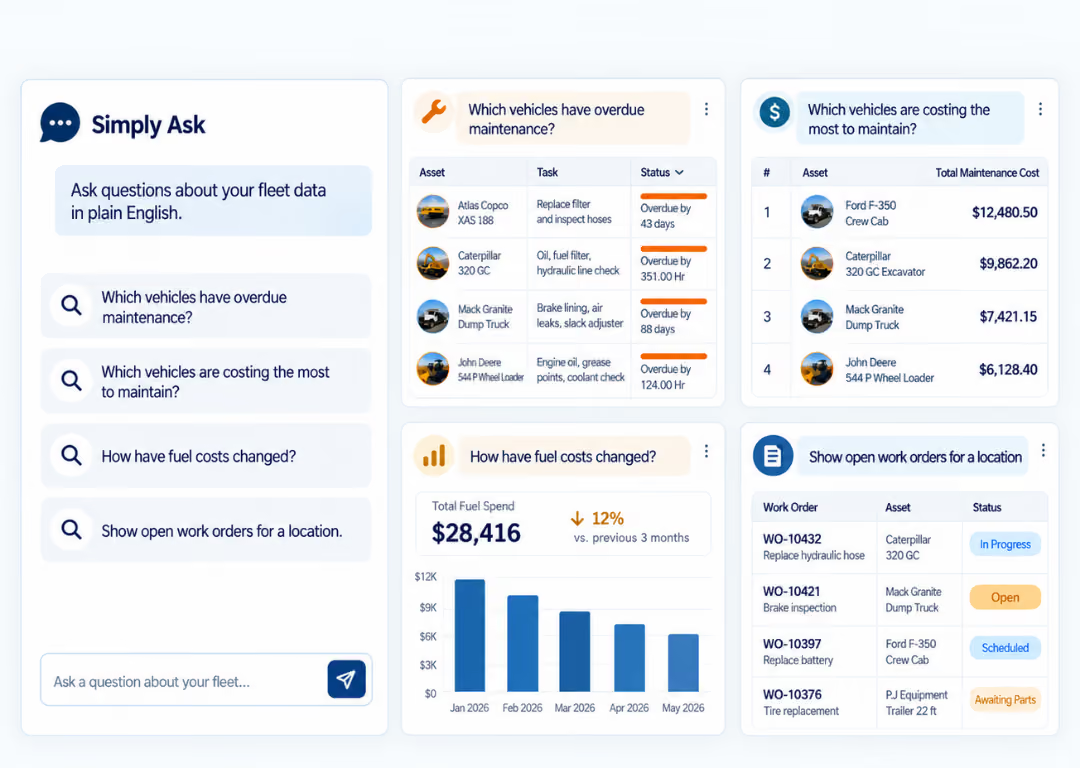
Check the answer: Open the related repair records. Verify whether the jobs concern the same fault, whether earlier work was completed, and whether repair descriptions are consistent.
Next action: Ask the maintenance lead to review the repeated work, parts used, and technician notes before assigning another repair. Repeated job titles do not automatically prove a recurring mechanical fault.
Author's Perspective: Check the Repair History Before Calling It a Repeat Failure
Three similar work orders can indicate a recurring fault, three unrelated jobs, or an administrative correction. The report should identify the vehicle and records worth investigating, not replace the technician's diagnosis.
2. Which Vehicles Are Becoming More Expensive per Mile?
A vehicle with high total maintenance spending may simply travel more miles. Cost per mile helps put spending into context, provided that the costs and mileage cover the same reporting period.
Simply Ask surfaces cost per mile, repair history, and total cost of ownership (TCO) from the fleet information you have recorded. The underlying expenses and mileage must be complete enough for a meaningful comparison.
Check the answer: Confirm the mileage period, expense categories, and vehicle group. A vehicle with unusually low mileage may show a high cost per mile even without a major new repair.
Next action: Compare similar vehicles, then inspect the biggest cost contributors. Look for recurring repair costs, missing odometer readings, or incorrectly assigned expenses before changing the maintenance plan.
3. Which Inspection Defects Still Need Repair Follow-Up?
In Simply Fleet, issue management connects failed-inspection issues to repair work orders. A failed inspection can automatically create an issue; an authorized team member can then convert it to a work order and assign the repair. Fleet managers need to check which reported problems remain unresolved.
Old workflow: Compare inspection submissions with an issue register and the work order list. Match vehicles and defect descriptions, then check whether each repair was completed. Different dates or descriptions can make this difficult.
Simply Ask workflow: Ask for open inspection issues, identify the affected vehicles, and refine the view to those requiring follow-up.
Check the answer: Open the inspection issue and its related work order, if any. Verify the actual repair status rather than interpreting an open issue as proof that the vehicle is operating unsafely.
Next action: Review whether the vehicle should remain out of service, set the appropriate work order priority, check parts availability, and coordinate shop time. The authorized maintenance team makes the repair and vehicle-release decisions.
Use Simply Ask in Four Steps
1. Ask: Enter one question with a vehicle group and a defined period. Start with repeat repairs, cost per mile, or unresolved inspection issues.
2. Review: Check which records and dates the response uses. Open the underlying entries when something looks unusual.
3. Refine: Use Smart Adjustments to narrow the result. For example, try "Only show vehicles over 100,000 miles" or "Exclude routine oil changes," where the necessary data is available.
4. Act: Save the useful report, export it when needed, and assign the investigation or repair follow-up. The report highlights a question to resolve; it does not carry out the repair.
Fleet Budget Calculator Excel
Prevent costly breakdowns and maximize uptime with our free checklist.
Download
Turn Useful Questions Into Weekly Fleet Reports
Once you find a report worth checking again, make it part of a short weekly maintenance review. There is no need to rebuild the same filters every Monday.
Set a clear reporting question
Example
Which vehicles have repeat repairs this month?
Owner
Fleet or maintenance manager
Refine the scope
Example
Filter by depot, asset type, or repair category.
Check
Confirm the returned records match the chosen period.
Save the useful view
Purpose
Avoid rebuilding the same question for every review.
Verified feature
Simply Ask supports saved reports and reruns without additional credits.
Document the decision
Purpose
Turn a report into an inspection, work order review, or cost investigation.
Record
Owner, due date, finding, and next check.
- Refine with Smart Adjustments: Narrow a broad report by vehicle group, time period, or repair type instead of starting from scratch.
- Use Saved Reports: Save recurring questions and rerun those reports as needed. Simply Fleet supports rerunning saved reports without additional AI credits.
- Export for reviews: Share the relevant report with technicians, operations managers, or internal reviewers. Check the source records before using a report in a compliance review.
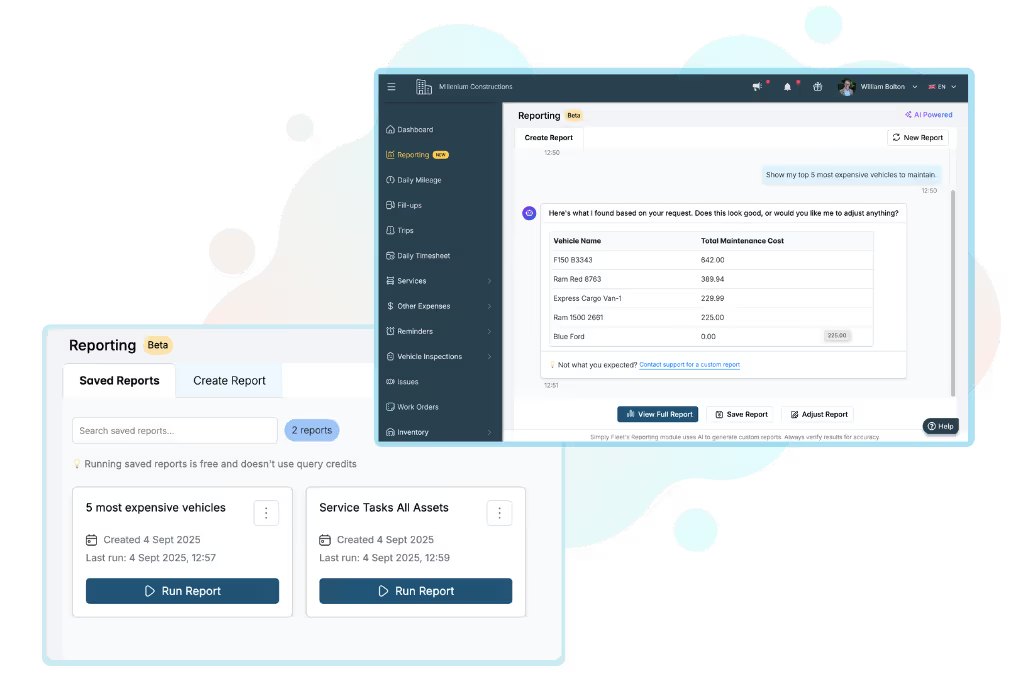
Author's Perspective: Keep the Question Consistent
If you compare cost per mile every week, keep the cost categories, vehicle group, and date rules consistent. Otherwise a change in the report setup can look like a change in the fleet.
Before Acting on a Fleet Report, Check These Four Things
Vehicle identity
Verify
The costs and work orders are associated with the correct asset.
Why
A wrongly assigned expense can create a false outlier.
Time window
Verify
The compared records cover the same dates.
Why
A quarterly repair total should not be divided by annual mileage.
Status and completeness
Verify
Open, completed, and cancelled jobs are interpreted correctly.
Why
Incomplete or duplicate records may distort the trend.
Cost definition
Verify
Everyone agrees which expense categories belong in the calculation.
Why
Repair cost, maintenance cost, and TCO are not interchangeable.
Start with vehicle identity, date range, work order status, and cost definition. If the report shows a surprising result, verify the source entries before scheduling repairs or escalating a replacement decision.
Why Maintenance Teams on Reddit Question Their Reports
In a Reddit discussion about CMMS data accuracy, maintenance practitioners described problems such as mismatched paper and digital records and incorrect or incomplete work orders. These are individual accounts, not fleet-industry benchmarks. The practical point is relevant: reliable reports require reliable source data.
Use your review to correct missing costs, inconsistent repair descriptions, and outdated work order statuses. For broader context on scheduled findings versus prompted reporting, see AI Insights and the customizable fleet dashboard. Simply Ask answers your question; AI Insights brings forward potential patterns without waiting for one.
What to Do After You Spot a Trend
- Repeat repairs: Review service notes and ask a technician to confirm whether the fault is recurring.
- Rising cost per mile: Verify cost and mileage records, then investigate the highest contributors.
- Open inspection issues: Check the repair status, appropriate priority, parts, and vehicle availability.
- Useful weekly finding: Save the question, assign an owner, and review the results again.
Fleet reporting should lead to a specific next step. With Simply Ask, managers can ask about fleet costs, repairs, and inspections in plain English, refine the report, and return to saved views when it is time for the next maintenance review.
Find the repair pattern before it becomes another costly surprise.
Ask questions about your fleet records in plain English, inspect the evidence, and turn the answer into a maintenance decision your team can act on.